
Web Accessibility Tools in 2026: 6 Solutions Compared for EAA and WCAG
A note on who wrote this: Wawsome is one of the tools on this list (you'll find us at number three). We've tried to be straight about where we fit and where other tools do the job better. The criteria are at the top so you can judge the ranking yourself.
Since the European Accessibility Act applied from June 2025, "we'll get to accessibility later" stopped being an option for a lot of businesses selling into the EU. So you start looking for a tool, and the market hits you with a wall of identical promises: one click, fully compliant, done by Friday.
It's worth knowing that one of those promises recently cost a company a million dollars. In 2025 the US Federal Trade Commission fined the vendor $1 million for claiming its widget could make any website WCAG-compliant, and barred it from repeating the claim. That's the backdrop for any honest comparison in 2026: the tool matters, but so does what the vendor actually promises.
Here's a straight look at six solutions, what each is good at, and where each falls short.
How we ranked these
Five things, weighted for a typical EU business that needs to handle the EAA without a dedicated accessibility team:
- Honesty of the compliance claim — does it promise what it can deliver, or sell magic?
- EAA / EU fit — built for European rules, or retrofitted from US ADA marketing?
- Evidence and monitoring — can it show your work if someone asks for documentation?
- Setup effort — developer required, or one line of code?
- Price transparency — clear pricing, or "contact sales"?
A tool that scores well for a 20-page SME site might score badly for a bank, and the other way round. We've said who each one is for.
1. AudioEye
What it is: A US-based platform that pairs automated detection with human expert remediation on its higher tiers. One of the older, more established names in the space.
Best for: Mid-market and enterprise teams, mostly US-focused, that want automation plus a human in the loop and some legal backing.
Pros: The hybrid model is a real strength: the automated layer catches the easy issues, and paid expert review covers things software can't judge on its own. Good track record, broad feature set, and support that knows the US legal terrain.
Cons: The automated layer is still widget-based, so it inherits the limitations screen-reader users report with any overlay. Pricing climbs quickly once you add human remediation, which puts the genuinely useful tiers out of reach for smaller sites. Positioning and content lean heavily toward ADA, so EU specifics are not the focus.
Rough price: Self-serve plans start low; the meaningful (human-assisted) tiers are quote-based. Check current pricing.
2. Level Access (with UserWay)
What it is: The most comprehensive option here. Level Access is a full enterprise accessibility program: manual audits, managed services, training, and the UserWay widget after its acquisition.
Best for: Large organisations that need a managed accessibility programme, not a plugin. Banks, universities, public bodies.
Pros: This is the thorough end of the market. You get real audits, expert services, ongoing governance, and the documentation an enforcement body actually wants to see. If accessibility is a board-level risk for you, this is built for that.
Cons: Enterprise cost and enterprise complexity. It's sales-led, onboarding takes time, and it's overkill for a small business that just needs its website sorted. You don't buy this with a credit card on a Tuesday afternoon.
Rough price: Enterprise, quote-based.
3. Wawsome
What it is: An automated scanner and widget built specifically around the EAA and EU compliance, installable with one line of code, no developer needed. The scanner checks your site against WCAG criteria and flags what's actually broken; the widget covers user-facing adjustments.
Best for: EU-based SMEs and e-commerce sites that need to handle the EAA, want to be up and running fast, and care about keeping evidence of what they've done.
Pros: EU-first by design, so the rules it's built around are the ones that apply to you, not a US framework with European labels. Setup is genuinely a one-liner. The scanner surfaces concrete issues you can act on rather than hiding everything behind a toolbar, and it's built to produce the kind of records you'd want if a compliance question ever lands on your desk. And — given the company that opened this article — Wawsome doesn't sell "instant full compliance," because no automated tool can deliver it.
Cons: It's a younger, smaller brand than the US incumbents, so you won't find a decade of third-party reviews yet. Like every automated tool on this list, it doesn't replace manual testing for full conformance on a complex site. And the EU focus that's a strength for a European business is less of a fit if your main exposure is US ADA litigation.
Rough price: SMB-friendly and transparent — run a free scan first at scan.wawsome.com to see where your site stands.
4. UserWay
What it is: One of the most widely deployed accessibility widgets, AI-powered, with a large language range and a low entry price. Now part of Level Access.
Best for: Small businesses that want something cheap and quick, and aren't ready to think about a full programme.
Pros: Easy to add, affordable at the entry tier, and used on a huge number of sites, so it's a known quantity. Being under the Level Access umbrella means professional services are there if you grow into them.
Cons: As a widget, it carries the overlay limitations the screen-reader community has documented, and everything depends on the script loading correctly at runtime. Full audits are a separate, considerably more expensive purchase. The entry plan is a starting point, not a finish line.
Rough price: Entry plans roughly $49–69/month; audits priced separately and not cheap.
5. accessiBe
What it is: A large, heavily marketed AI overlay with one of the biggest install bases in the category.
Best for: Businesses that specifically want accessiBe's ecosystem and fast deployment, and are comfortable evaluating the tool on its current, post-settlement terms.
Pros: Quick to install, feature-rich, and backed by a large support and partner network. The sheer scale means plenty of integrations and documentation.
Cons: The 2025 FTC settlement is the headline you can't ignore: the company paid $1 million and is now prohibited from claiming the tool makes sites compliant. Beyond the regulatory side, accessiBe sits at the centre of the disability community's criticism of overlays, and shares the same runtime-dependency and screen-reader-conflict issues as the rest of the category. Worth evaluating with eyes open.
Rough price: Entry tier historically around $49/month; check current plans.
6. EqualWeb
What it is: A hybrid solution that combines an automated widget with optional manual remediation, with flexible tiers and a free entry option.
Best for: Smaller sites that want to start free and add human help later without committing to an enterprise contract.
Pros: The hybrid approach gives you a path from automated-only toward expert review, the free tier lowers the barrier to starting, and the pricing is flexible.
Cons: The automated layer is overlay-based, with the usual category caveats. It's less known than the bigger names, so independent reviews and support depth are harder to gauge before you commit.
Rough price: Free tier available; paid tiers scale with manual support.
The thing every tool on this list has in common
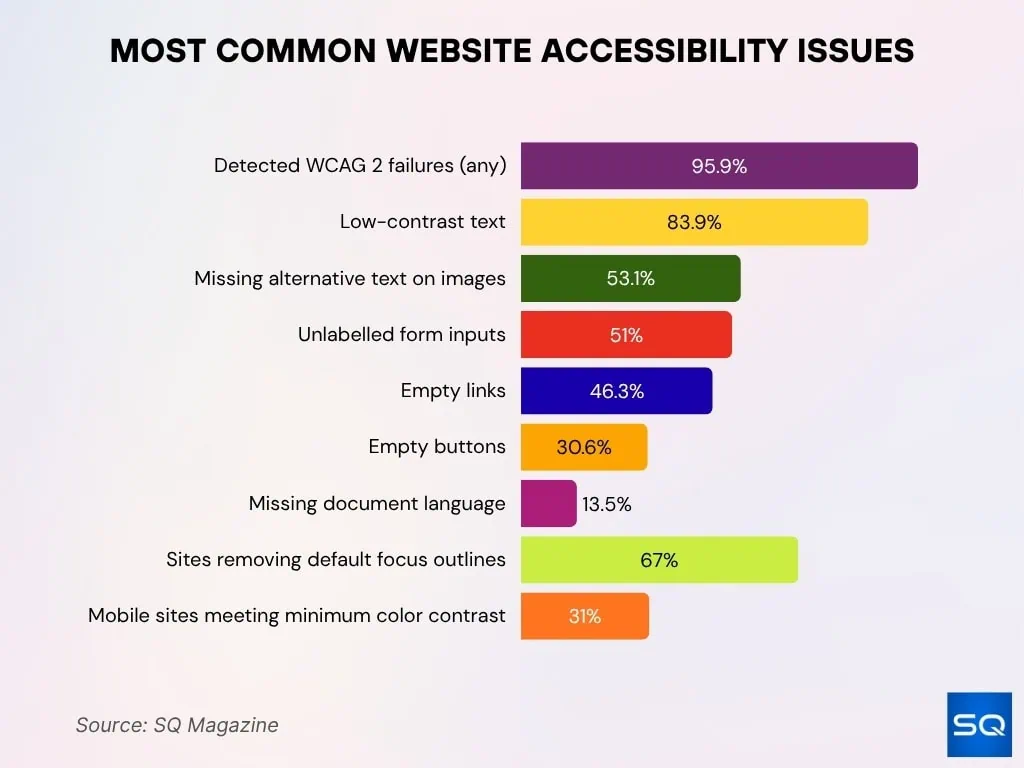
None of them, on automation alone, makes a website fully compliant. That's not a knock on any one product, it's how the technology works. Automated checks reliably catch a meaningful share of issues (missing alt text, contrast problems, unlabeled form fields), but judgement calls (does this alt text actually describe the image, does the page make sense in a logical reading order) still need a human.
So the honest way to use any of these is: let the tool do the heavy, repetitive detection and the ongoing monitoring, fix what it finds, and bring in manual testing for the parts that need a person. A vendor that tells you the tool does all of it by itself is telling you the exact thing the FTC fined a company for.
Where to start
If you're an EU business trying to get the EAA handled without turning it into a quarter-long project, start by finding out where you actually stand. Run a free scan at scan.wawsome.com, see what comes back, and decide from there. Knowing the size of the problem is most of the work.
Sources
- European Commission - European Accessibility Act
- AccessibleEU - EAA comes into effect June 2025
- FTC - Order Requiring accessiBe to Pay $1 Million
- European Commission - Monitoring Methodologies for Web Accessibility
- W3C WAI - Web Accessibility Evaluation Tools List
- Web Accessibility in 2026 - Web Design Statistics 2026: Mobile, Speed & Accessibility