
AI builds your site. Wawsome makes sure everyone can use it.
Tools like Lovable, Bolt, and v0 get you a working site in an afternoon, and they're good at it. What they don't do is check whether that site works for someone on a screen reader or a keyboard, or give you anything to show when a client or an authority asks. That's the part Wawsome handles.
Every scan runs against EN 301 549 and WCAG 2.2 — the standards the EAA points to.
Wawsome and a vibe-coded fix, side by side
Why teams choose Wawsome over a DIY fix
AI generates. It doesn't verify. Ask an AI to "make this accessible" and it'll add alt text and a few labels. What it won't tell you is what it skipped, or whether the result works for someone navigating by keyboard. Wawsome scans the live page against real WCAG criteria and shows you exactly what's missing.
Compliance isn't a one-time prompt. The EAA didn't come with a finish line. Every new page, every redesign, every move from WCAG 2.1 to 2.2 reopens the gaps. Wawsome monitors continuously, so you're not re-checking by hand each release.
Proof, not vibes. A vibe-coding session leaves you with a feeling that the site is fine. When a client's procurement team or an authority asks for evidence, a feeling isn't a document. Wawsome gives you audit-ready exports you can hand over.
One line, not a refactor. You finished the site. You don't want to go back into the code. Wawsome installs with a single line, no developer and no rebuild, and works from there.
Where the gaps actually come from
The same four gaps show up across almost every AI-built site, because they sit where the tool's components can't help.
The content the AI fills in. The two most common accessibility failures on the web are low-contrast text and missing image alt text — and a component library can't fix either. AI picks colour tokens for how the brand looks, not for the 4.5:1 contrast ratio WCAG asks for, and generated or placeholder images often ship with missing or generic alt ("image", a filename, or nothing).
The custom parts. Standard components are one thing. The moment you prompt "make me a custom X" — a bespoke dropdown, a clickable card, a fancy nav — the AI may hand-roll it as a styled div instead of a real button or link. It looks identical and works with a mouse, but a keyboard user can't reach it and a screen reader announces nothing.
The page around the components. Components don't govern the whole document. Heading order gets skipped, the page may not declare its language, landmark regions and a skip link go missing, and every route can share one generic title. None of it shows in the preview; all of it matters to someone using a screen reader.
What happens after a click. Most of these tools build single-page apps. By default, moving between "pages" doesn't move keyboard focus or announce the change to assistive tech. And because AI-generated pages lean heavily on ARIA, there's a twist: misapplied ARIA makes things worse, not better — WebAIM found pages using ARIA averaged more than double the errors of pages without it.
This isn't a hunch
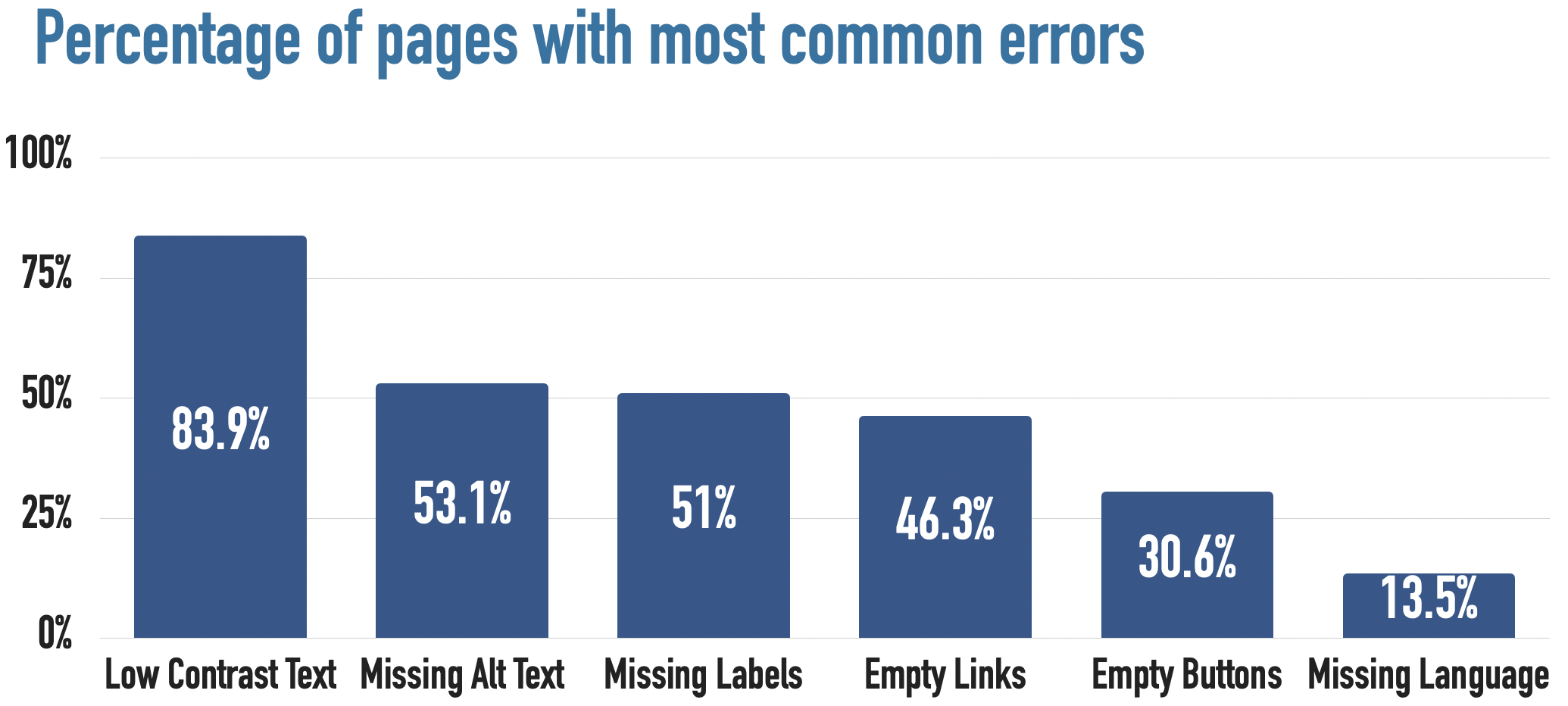
In WebAIM's 2026 analysis of the top million home pages, accessibility errors rose about 10% in a single year, reversing years of slow improvement. The report ties the reversal partly to rising page complexity and AI-assisted coding it names "vibe coding." Low-contrast text alone now appears on roughly 84% of home pages. The same six issues — contrast, alt text, form labels, empty links, empty buttons, missing language — have accounted for around 96% of all detected failures for seven years running. A faster way to build hasn't changed which things get missed. It's added more of them.
How it plays out in the tool you're using
Lovable generates React with shadcn/ui components, built on Radix primitives, so a lot of the hard parts come baked in: focus handling in menus and dialogs, keyboard interaction on standard controls, sensible ARIA. You're starting ahead of most of the web. The gaps are the ones above: the colours and images it fills in, any custom parts you prompt for, the page structure, and the fact that nothing checks the finished page against the standard.
Scan your Lovable site for free
Bolt (from StackBlitz) runs in a browser WebContainer and, like Lovable, leans on React with Tailwind and shadcn-style components, so the same accessible primitives — and the same blind spots — apply. Where it tends to bite harder: Bolt is built for speed to a shareable demo and its backend story is thinner, so teams often wire up forms and custom flows by hand. That's exactly where labels and keyboard support go missing. The components are fine; the glue between them is where to look.
Vercel's v0 generates Next.js with shadcn/ui and Tailwind, and it began as a component generator, so its UI primitives are among the cleanest here. It even runs an automated scan on every generation — for security issues like exposed keys, not for accessibility. That's the tell: a tool can check itself for one class of problem and still hand you contrast failures and missing alt text untouched. Strong components don't add up to a compliant page on their own.
Replit Agent is a different animal. It doesn't commit to one component library — it picks a stack per project, anything from React to a Python backend, and writes much of the structure itself. So there's no guaranteed accessible baseline the way shadcn gives Lovable or v0; what you get depends on what the Agent chose and how cleanly it built it. AI-generated code here is often quick but non-idiomatic, which is fertile ground for the structural and labelling gaps a scan catches. Less predictable bones, more reason to check the finished page.
Scan your Replit site for free
Cursor (and other in-editor assistants) isn't a site builder — it's an AI assistant inside your own editor, writing into the codebase you already have. So accessibility is only as good as what you ask for and what you review. Cursor will add an aria-label if you prompt it to, and just as happily ship a clickable div if you don't. There's no build step that even tries to check the result. If you're shipping with Cursor, Claude Code, or Copilot, the finished site still needs an independent pass against the standard — the assistant won't do it for you.
See it on your own site
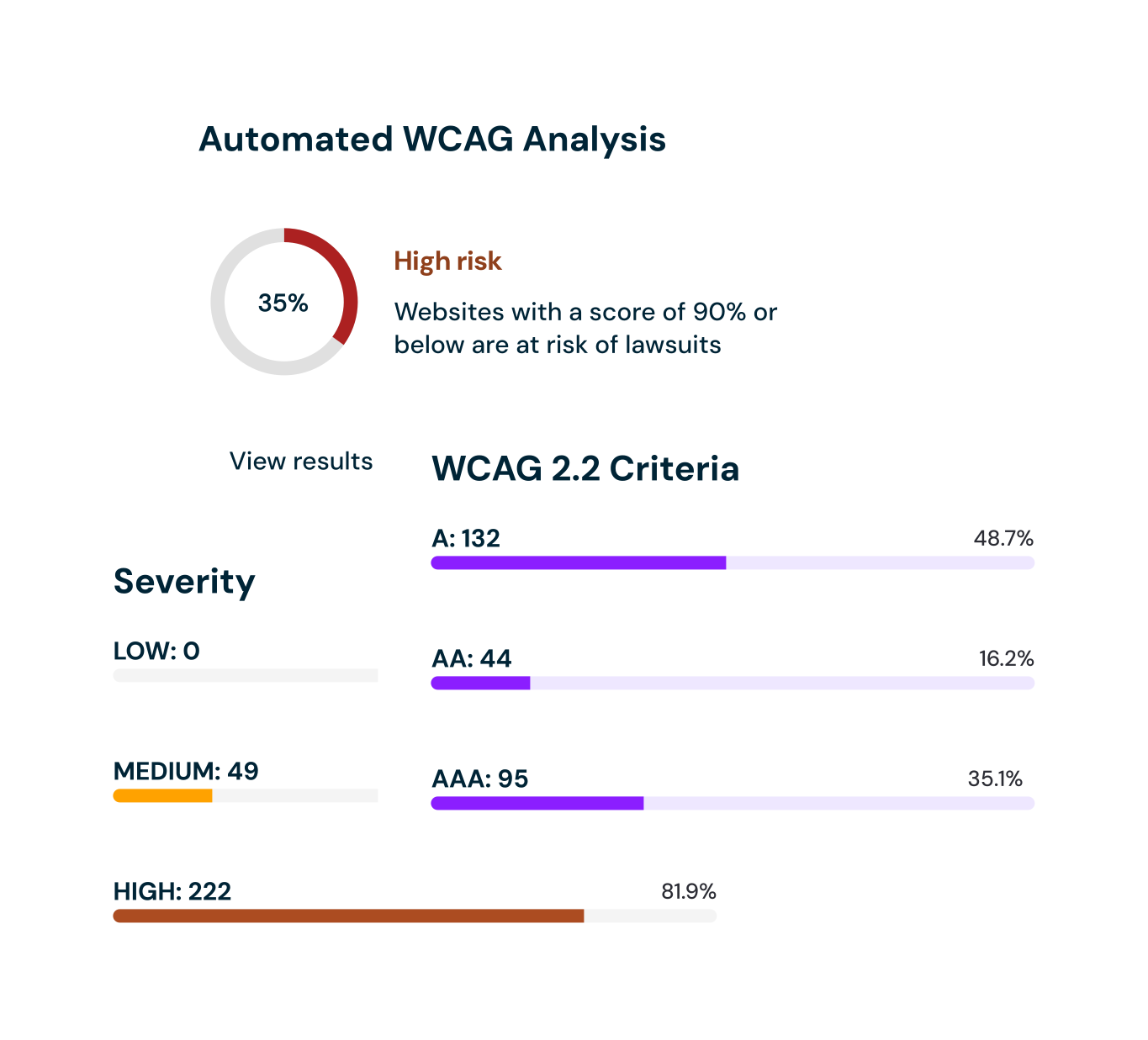
Take your site's URL and run it through our checker. The scan reads the rendered page — the actual DOM your tool ships, after styles and scripts — and reports against WCAG 2.2 / EN 301 549. You'll see the contrast failures, the unlabelled images and controls, and the structural gaps in about 10 seconds. No sign-up to see the result.
How Wawsome fits with the way you build
Wawsome doesn't replace your builder. Keep building the way you build. It sits on top of the finished site:
- Run a free scan. Point scan.wawsome.com at your site and see where it stands.
- Add one line of code. No export, no refactor, no second developer.
- Apply the fixes. The widget handles the common gaps the scan flagged.
- Leave monitoring on. As you add pages and re-prompt, Wawsome keeps checking, so compliance doesn't drift back out — and the evidence exports give you something to show a client or an authority.
Is Wawsome right for your team?
Wawsome is worth a look if a few of these land:
- You built, or are building, your site with an AI tool
- You sell to or serve customers in the EU, so the EAA applies
- You don't have a developer or accessibility specialist on call
- You've never run the finished site against WCAG
- You'd rather not re-check by hand every time you re-prompt
FAQ
Can AI make a website accessible?
Partly. AI tools handle the visible fixes: alt text, labels, contrast — but they can't verify their own work against the standard or give you proof of compliance. That's the gap Wawsome closes.
Is my Lovable / Bolt / v0 site EAA-compliant?
Not automatically. These tools start you well on the component side, but the content, custom parts, and page structure usually meet some of the standard, not all. A scan tells you which.
Why did my AI-built site fail a scan if the components are accessible?
Accessible primitives don't guarantee an accessible page. Contrast, alt text, headings, and any custom components are decided by the generated output, not the library.
Do I need a developer to fix it?
No. Wawsome installs with one line, and the widget handles the common fixes.
Does the EAA actually apply to me?
Remember GDPR? Same shape. If you offer services to EU consumers, the EAA — in force since 28 June 2025 — likely applies. Wawsome isn't legal advice, so check your obligations; the technical bar is EN 301 549 / WCAG 2.2.
Use AI to build. Use Wawsome to stay compliant.
The site is the easy part now. Making it work for everyone, and being able to show it, is the part worth getting right. Run a free scan and see where yours stands.