
Drupal has no built-in field for site-wide code. To add Wawsome, use the Asset Injector module, or ask your developer to add the code to your theme. Then clear all caches.
Before you start
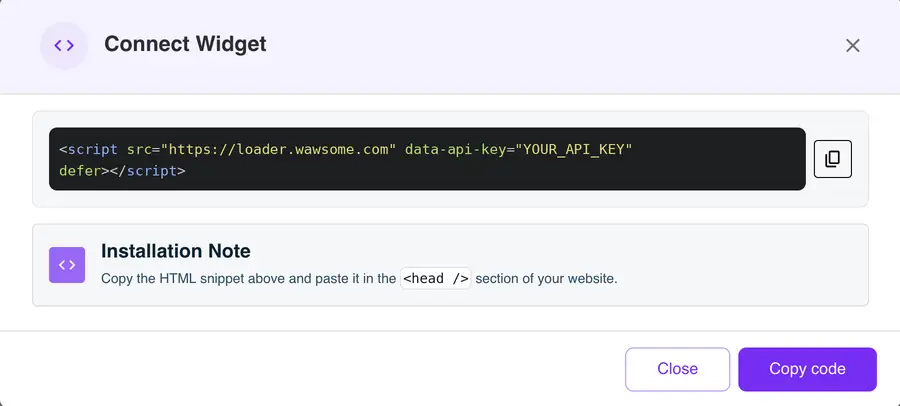
- A Wawsome account with your website added. Get your code in the dashboard: go to Websites, select your site, click Install Widget, then Copy code in the Connect Widget window.
- Admin rights to install modules, or a developer who can edit your theme.
Option 1: Asset Injector module (no code editing)
Asset Injector accepts JavaScript, not HTML tags. So you'll paste a short JavaScript version of your Wawsome code. You only need your API key: it's the value after data-api-key= in the code you copied.
- Install and enable the Asset Injector module.
- Go to Configuration > Development > Asset Injector > JS Injector and add a new injector.
- Give it a title, like "Wawsome widget".
- Paste this code and replace YOUR_API_KEY with your key:
(function () {
  var s = document.createElement('script');
  s.src = 'https://loader.wawsome.com';
  s.setAttribute('data-api-key', 'YOUR_API_KEY');
  s.defer = true;
  document.body.appendChild(s);
})();
Then leave the conditions empty, so it loads on every page, and click Save.
Option 2: Add the code to your theme
Your developer can add the Wawsome code to your theme, for example in the html.html.twig template inside the head, or as an external script in the theme's libraries file. This keeps the code in your theme files, under version control.
Check that it works
Go to Configuration > Development > Performance and click Clear all caches. Then open your site in a private window and look for the Wawsome button.
Don't paste the code into a content field. Drupal text formats remove script tags, so it won't load.
What the widget does and doesn't fix
- Visitors can adjust text, colors and navigation to their needs.
- AI adds alt text to images that have none. You can edit every label.
- Your theme and content still need care. A scan finds issues like missing labels or low contrast on each page.
Learn more: Run a free scan · Accessibility audits
Drupal accessibility FAQ
Can I add the code without a developer?
Yes, with the Asset Injector module and the JavaScript version above. You need admin rights to install the module.
Why isn't the widget showing?
Clear all caches first. If it still doesn't show, check that your API key is right and that the injector has no conditions that hide it.
Isn't Drupal already accessible?
Drupal core aims for WCAG 2.2 AA, and its default themes, Olivero and Claro, are built with accessibility in mind. Your own theme, modules and content can still add issues. The widget helps visitors adjust the page, and a scan shows what still needs a fix.
Get started with Wawsome
Make your Drupal site easier to use for every visitor. Start your free trial, or book a demo and we'll show you how Wawsome works.
Start your free trial or book a demo (opens in a new tab).
Related guides: Add Wawsome to any website · Install with Google Tag Manager