
To add the Wawsome accessibility widget to any website, paste one line of code in the head of every page. Most platforms have one place for this, like a custom code field or a shared layout file. You can also add it with Google Tag Manager.
Before you start
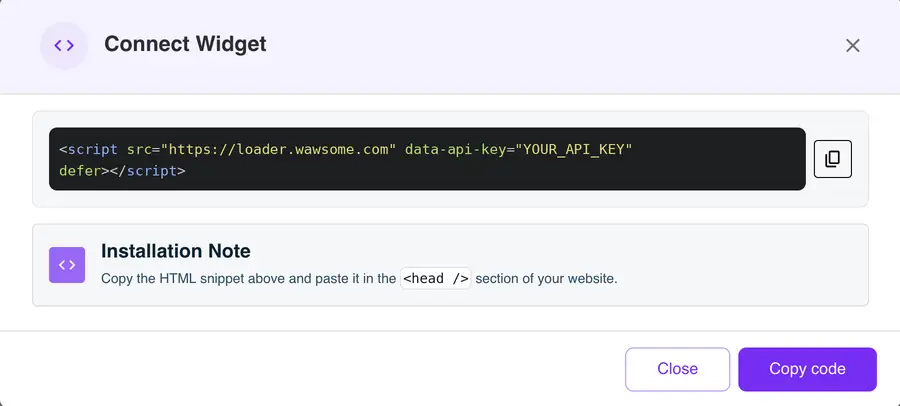
Get your code from the Wawsome dashboard: go to Websites, select your site, click Install Widget, then Copy code in the Connect Widget window. It looks like this, with your own key:
<script src="https://loader.wawsome.com" data-api-key="YOUR_API_KEY" defer></script>
Where to paste the code
The code needs to load on every page. Pick the option that fits your site:
- Your platform has a custom code setting. Look for names like Custom code, Code injection, Head code or Scripts. Paste it in the head field if there is one.
- You edit the HTML yourself. Paste it inside
<head>in the template or layout file that every page shares. On a static site, add it to each page. - You use Google Tag Manager. Add it as a Custom HTML tag with the All Pages trigger. See our Google Tag Manager guide.
- Your platform only accepts JavaScript. Use this version and replace YOUR_API_KEY with your key:
(function () {
  var s = document.createElement('script');
  s.src = 'https://loader.wawsome.com';
  s.setAttribute('data-api-key', 'YOUR_API_KEY');
  s.defer = true;
  document.body.appendChild(s);
})();
Step-by-step guides for popular platforms: WordPress, Shopify, Wix, Squarespace, Webflow, Joomla, Drupal, PrestaShop, Magento.
Check that it works
Publish or save your changes and clear any cache. Open your site in a private window and look for the Wawsome button. Open it and try one setting.
If the widget doesn't show
- Cache. Clear your site's cache and any CDN cache, then reload.
- The code was removed. Some editors strip script tags from content fields. Use a custom code setting or a template file instead.
- Content Security Policy. If your site has a CSP, allow
https://*.wawsome.comin script-src and connect-src. - Wrong key or domain. Check that the key matches the website you added in the dashboard.
What the widget does and doesn't fix
- Visitors can adjust text, colors, spacing and navigation, and use reading tools.
- AI adds alt text to images that have none, and you can edit every label.
- Some issues need a fix in your code or content. A scan finds them, and our experts can test your site by hand.
Learn more: Run a free scan · Accessibility audits · Accessibility widget
FAQ
Where exactly do I paste the code?
In the head of every page, as the Wawsome dashboard says. If your platform only has a footer field, that works too.
Does it work with headless CMSs and single-page apps?
Yes. Wawsome works with content loaded through APIs and modern frameworks. Add the code to the main HTML file or layout that every route uses.
My platform isn't listed. Can I still use Wawsome?
Yes. If your platform lets you add custom code to every page, you can add Wawsome. Follow the steps above, or contact us and we'll help.
Get started with Wawsome
Make your website easier to use for every visitor. Start your free trial, or book a demo and we'll show you how Wawsome works.