

To add Wawsome to Squarespace, paste your Wawsome code in the Header field of Code Injection and click Save. The widget then loads on every page of your site.
Before you start
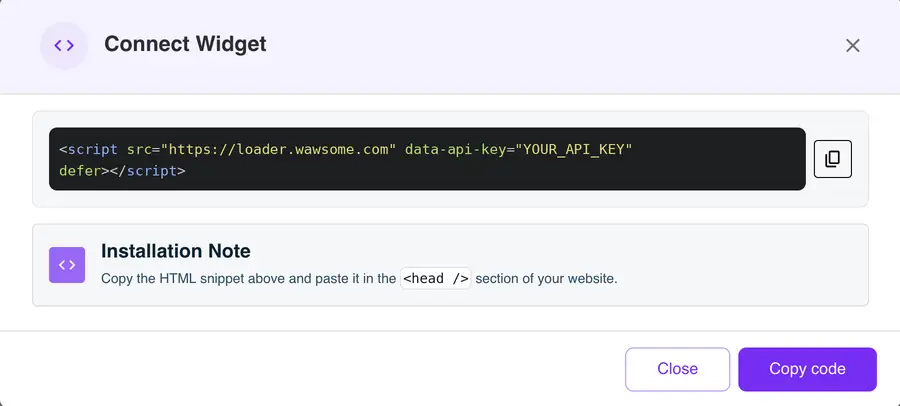
- A Wawsome account with your website added. Get your code in the dashboard: go to Websites, select your site, click Install Widget, then Copy code in the Connect Widget window.
- A Squarespace plan with Code Injection. It's included in Core, Plus, Advanced and some older plans.
How to add Wawsome to Squarespace
- Log in to Squarespace and open your site.
- Open the Code Injection panel.
- Paste your Wawsome code in the Header field. It loads in the head of every page. The code uses defer, so it doesn't hold up your content.
- Click Save.
That's it. Squarespace has no separate publish step for code injection.
Check that it works
Open your site in a private window and look for the Wawsome button. Open it and try one setting.
If the editor acts strangely after you save, open it in safe mode: add /safe after /config in the address bar. Safe mode turns off injected code while you edit.
What the widget does and doesn't fix
- Visitors can adjust text, colors, spacing and navigation to their needs.
- AI writes alt text for images that have none, and you can review every label.
- Your template, colors and content still matter. If your template has low contrast or your forms lack labels, fix them in Squarespace. A scan shows you where to start.
Learn more: Run a free scan · Accessibility audits
Squarespace accessibility FAQ
Which Squarespace plans include Code Injection?
Core, Plus, Advanced and some legacy plans. If you don't see Code Injection in your site, check your plan in Billing.
Will the widget show on my checkout page?
No. Squarespace doesn't run code injection on checkout pages or on index landing pages. The widget works on all your other pages.
Is Squarespace accessible out of the box?
Squarespace gives guidance on making your site more accessible, like adding alt text and using clear headings. How accessible your site is depends on your template and your content. The widget helps visitors adjust the page, and a scan tells you what still needs work.
Get started with Wawsome
Make your Squarespace site easier to use for every visitor. Start your free trial, or book a demo and we'll show you how Wawsome works.
Start your free trial or book a demo (opens in a new tab).
Related guides: Add Wawsome to any website · Install with Google Tag Manager