

To add Wawsome to Wix, copy your code from the Wawsome dashboard and paste it in Settings > Custom Code, in the head of all pages. Then publish your site and check the widget on your live domain.
Before you start
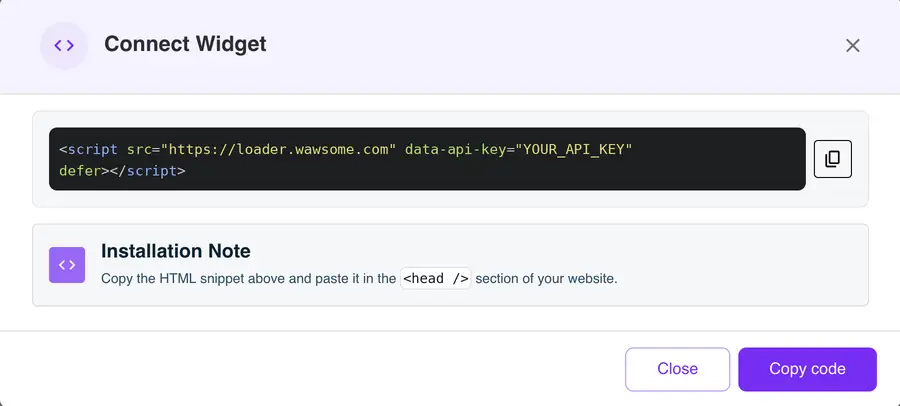
- A Wawsome account with your website added. Get your code in the dashboard: go to Websites, select your site, click Install Widget, then Copy code in the Connect Widget window.
- A published Wix site with a connected domain. Wix only lets you add custom code to sites that meet both conditions.
How to add Wawsome to Wix
- Open your site's dashboard in Wix and go to Settings.
- Scroll to Development & integrations and click Custom Code.
- Click + Add Custom Code at the top right.
- Paste your Wawsome code and give it a name, for example "Wawsome widget".
- Under Add Code to Pages, choose All pages and load it on each new page.
- Under Place Code in, choose Head. Click Apply.
Wix sets new code as Essential by default. Keep it that way, so the widget loads for every visitor, even before they answer your cookie banner. The widget doesn't use cookies.
Check that it works
Wix runs custom code on your published site only, not in the Editor. Open your live domain in a private window. You should see the Wawsome button in the corner you chose. Open it and try one setting, like bigger text.
If you change your domain later, Wix deletes your code snippets. Add the code again after the switch.
What the widget does and doesn't fix
- It lets visitors adjust your site to their needs: text size, contrast, spacing, reading tools and more.
- It adds AI alt text to images that have none, and you can edit every label.
- Some issues live in your Wix design or content, like low contrast in your theme or a form without labels. The widget doesn't change those. Run a scan to find them, or ask our experts for an audit.
Learn more: Run a free scan · Accessibility audits
Wix accessibility FAQ
Does Wix have built-in accessibility tools?
Yes. The Wix Accessibility Wizard checks your site for common issues, like missing alt text and heading order. Wix doesn't include a toolbar for visitors. That's what the Wawsome widget adds, along with AI alt text and a scanner that keeps checking your pages.
What do I need before I can add custom code on Wix?
A published site with a connected domain. Wix doesn't let you add custom code to a site without both.
Why don't I see the widget in the Wix Editor?
Custom code only runs on your published site. Publish your changes and open your live domain to see it.
Get started with Wawsome
Make your Wix site easier to use for every visitor. Start your free trial, or book a demo and we'll show you how Wawsome works.
Start your free trial or book a demo (opens in a new tab).
Related guides: Add Wawsome to any website · Install with Google Tag Manager