
To add Wawsome to Joomla, create a Custom module, paste your Wawsome code, put it in a position that loads on every page and assign it to all pages. This works in Joomla 4 and 5 with the default Cassiopeia template.
Before you start
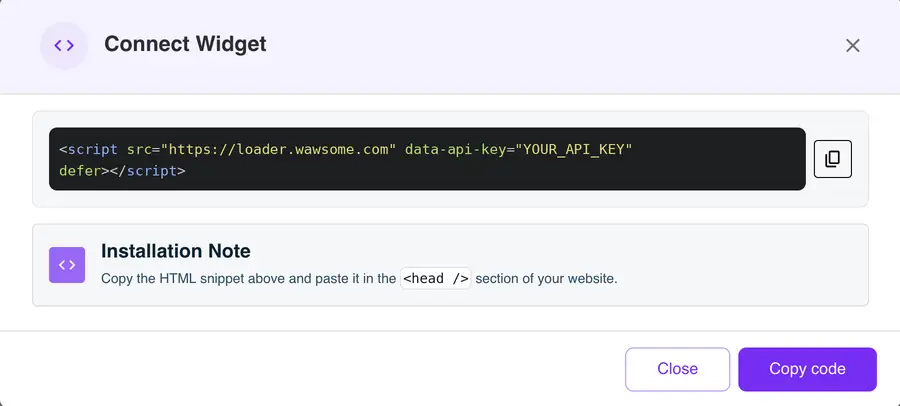
- A Wawsome account with your website added. Get your code in the dashboard: go to Websites, select your site, click Install Widget, then Copy code in the Connect Widget window.
- Administrator access to Joomla.
- An editor that keeps script tags. Joomla's default editor removes them. Before you start, open your user profile, go to Basic Settings and set the editor to None. You can switch it back after.
How to add Wawsome to Joomla
- Go to System > Site Modules and click New.
- Choose Custom.
- Give it a title, like "Wawsome widget", and hide the title.
- Paste your Wawsome code in the content field.
- Set Position to debug. In Cassiopeia, this position loads just before the end of each page.
- Open the Menu Assignment tab and choose On all pages.
- Click Save & Close.
Using another template? Pick any position that shows on every page, ideally near the footer. Some templates also have their own custom code field.
Check that it works
If caching is on, clear it in System > Clear Cache. Then open your site in a private window and look for the Wawsome button.
If you don't see it, open the module again. If the code is gone, the editor removed it. Set the editor to None and paste it again.
What the widget does and doesn't fix
- Visitors can adjust text, colors and navigation, and use reading tools.
- AI adds alt text to images that have none, and you can edit it.
- Issues in your template or articles, like missing form labels, need a fix in Joomla. A scan shows them page by page.
Learn more: Run a free scan · Accessibility audits
Joomla accessibility FAQ
Why does Joomla remove my code?
Joomla's default editor and text filters strip script tags to keep your site safe. Set your editor to None for this module. Only give the "No Filtering" option to user groups you fully trust.
Which module position should I use?
In Cassiopeia, use debug. It's empty by default and loads at the end of every page. In other templates, use a footer position that shows on all pages.
Does Joomla have accessibility checks?
Yes. Since Joomla 4.1, the built-in Jooa11y plugin checks your content for issues like missing alt text, low contrast and heading order. It works well alongside a Wawsome scan, which checks your whole site on a schedule.
Get started with Wawsome
Make your Joomla site easier to use for every visitor. Start your free trial, or book a demo and we'll show you how Wawsome works.
Start your free trial or book a demo (opens in a new tab).
Related guides: Add Wawsome to any website · Install with Google Tag Manager