
Digital accessibility for public services
Digital accessibility for public institutions and government services
Wawsome helps public institutions identify, prioritize, remediate and continuously monitor accessibility barriers across forms, appointments, payments, public information and other essential digital services.
- Accessibility Statement and progress reports
- Works on your current portal, no rebuild
1.3 billion
people worldwide experience significant disability.
Source: The Valuable 500
$13+ trillion
in annual disposable income is controlled by people with disabilities together with their friends and families.
Source: The Valuable 500, Valuable Truth 2022
1 of 5
disability inclusion KPIs proposed by The Valuable 500 is Digital Accessibility.
Source: The Valuable 500
When a public service is inaccessible, the barrier is institutional, not just digital.
Public websites and portals are often the way to taxes, appointments, applications, benefits, public information and civic participation. When those journeys are inaccessible, some citizens may not be able to complete them on their own.
Find information
Where citizens get stuck
Pages without a clear heading structure, or menus a screen reader can't announce, make information hard to find.
How Wawsome helps
The scanner flags heading and structure issues by severity. Keyboard-only navigation and AI-assisted ARIA improvements make menus easier to reach.
Understand eligibility
Where citizens get stuck
Long pages with dense text, low contrast or small type are hard to read, especially on a phone.
How Wawsome helps
Widget settings for text size, spacing, readable fonts and contrast let each citizen adjust the page to their needs.
Complete the form
Where citizens get stuck
Fields without labels, unclear instructions and focus that jumps around stop people halfway through.
How Wawsome helps
The scanner lists missing labels and focus issues in plain language, so developers can fix them at the source.
Upload documents
Where citizens get stuck
Upload buttons without an accessible name and PDF forms that screen readers can't read.
How Wawsome helps
Upload controls without names are flagged. Inaccessible PDFs go into a separate backlog for remediation.
Authenticate
Where citizens get stuck
Login steps with CAPTCHAs, time limits or codes that some users can't complete.
How Wawsome helps
The scanner flags CAPTCHA and timing barriers, so your team can plan an accessible alternative with the identity provider.
Pay or submit
Where citizens get stuck
Payment and submit steps with buttons that can't be reached with a keyboard.
How Wawsome helps
Keyboard-only navigation helps citizens reach every control. Remaining structural issues are prioritized for developers.
Get a confirmation
Where citizens get stuck
Error messages and confirmations that screen readers don't announce, so people don't know if it worked.
How Wawsome helps
Recurring scans catch new issues after template or platform changes, before they pile up.
Build a measurable accessibility baseline. Then keep it current.
Eight risks public institutions face, each with how Wawsome responds and the KPI it touches.
Compliance
Public institutions are subject to European and national digital accessibility requirements, which may set obligations distinct from those of the European Accessibility Act (EAA).
How Wawsome helps
The Scanner and reports create a common accessibility baseline for Digital, IT, Legal and management, with issues mapped to WCAG criteria and sorted by severity.
- Compliance evidence
Access to rights and services
Forms, tax payments, appointments, applications and public information may become inaccessible to some citizens, who then can't use essential services and rights on their own.
How Wawsome helps
We recommend starting with the services where access matters most: forms, tax payments, appointments, contact channels, public hearings and essential information.
- Digital service completion
Public trust
An inaccessible public website may be seen as an institutional barrier, not a simple UX issue. That can weaken trust in the institution's ability to serve all citizens.
How Wawsome helps
Accessibility Statements and reports give documented visibility into accessibility status, identified issues and remediation progress.
- Digital adoption
Operational efficiency
Requests that can't be completed online move to service counters, phone calls or email. That adds administrative work and lowers the value of digital self-service.
How Wawsome helps
Live-page fixes can quickly improve key parts of the experience on your current platform, so more requests can be completed online.
- Assisted-channel volume
Budget and legacy systems
Outdated platforms, long procurement cycles and multiple vendors can make full remediation slow and expensive.
How Wawsome helps
Wawsome deploys through one JS line or a GTM tag and works at the browser layer, without a complete rebuild or server-side changes.
- Time-to-service
Documents
PDFs, downloadable forms and document archives can remain major sources of accessibility problems, even after the website itself improves.
How Wawsome helps
Document and structural issues are identified, documented and prioritized in a separate backlog for later remediation.
- Form abandonment
Content governance
Many departments may publish content without shared accessibility guidelines, so new barriers appear after a first remediation.
How Wawsome helps
Recurring scans catch issues introduced by new content from any department, so the institution keeps a more consistent baseline over time.
- Issue trend
Public image
Complaints or documented cases of exclusion can draw scrutiny from citizens, media, NGOs and regulators.
How Wawsome helps
Monitoring history and reports show what was checked, what was fixed and what is planned, so you can answer questions with facts.
- Complaint volume
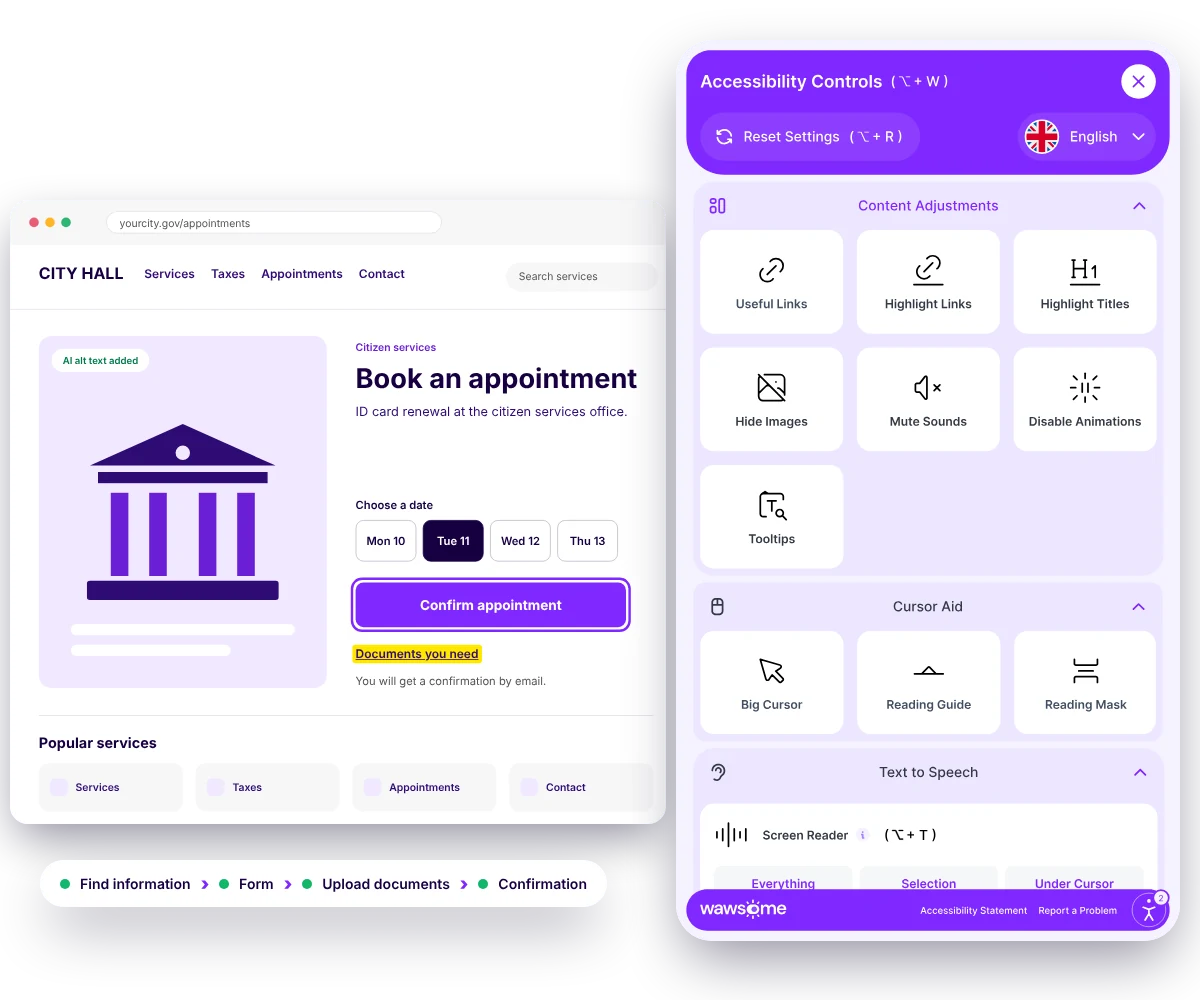
See the difference on a public form
Turn on a few widget settings and watch this sample appointment form change. It's a small preview of what the Wawsome widget lets citizens do on your website.
Try it on this form
Book an appointment
Service: ID card renewal. Location: citizen services office, desk 3.
Pick a free slot. You'll get a confirmation by email.
Upload documentsConfirm appointment
One platform. Every angle covered.
Automatic fixes
AI scans and patches selected issues such as missing image descriptions, broken ARIA and navigation structure.
Ongoing tracking
Your site is checked continuously, with accessibility score, issue trends and full history available in one place.
Easy setup
Deploy through one JS line or a GTM tag. Wawsome works at the browser layer, without server-side codebase changes.
Accessibility Statement
An individual Accessibility Statement, mapped in Wawsome documentation to the EAA, WCAG 2.1 AA, EN 301 549 and national laws.
Accessibility Widget
Predefined accessibility profiles, controls for text size, spacing, typeface, contrast and color scheme, keyboard-only navigation, screen-reader support, AI-assisted ALT and ARIA improvements, brand configuration and multi-language support.
Accessibility Scanner
WCAG 2.1 and 2.2 AA checks, prioritized plain-language reporting, Low, Medium and High severity, visibility across WCAG A, AA and AAA and an overall risk score.
- WCAG 2.1 and 2.2 AA
- EN 301 549
- Web Accessibility Directive


Continuous monitoring
Recurring scans check changes, alerts highlight areas that need attention and reports provide step-by-step remediation guidance.
A department publishes
A new page, a PDF or a template change.
A recurring scan checks it
Wawsome scans your pages again on schedule.
An alert flags what changed
New issues are highlighted by severity.
The right team fixes it
Reports give step-by-step guidance.
PDFs and downloadable forms need their own plan
Documents are a separate accessibility risk for public institutions. Wawsome helps you find and organize the issues. Fixing the documents themselves usually needs work at the source.
Needs work at the source
- Tagging and reading order inside PDFs
- Accessible versions of scanned documents
- Structural defects in legacy platforms
- Content rules for every department that publishes
What Wawsome does
- Finds inaccessible documents and structural issues on your site
- Documents them with severity in a separate backlog
- Helps you prioritize by service impact
- Checks again after new content is published
Better access for citizens. Better control for institutions.
More equal access
More citizens can use public services and information on their own.
- Digital service completion
- Digital adoption
Operational efficiency
Fewer requests move to counters, phone support or email because of digital accessibility barriers.
- Assisted-channel volume
- Time-to-service
Transparency
Accessibility improvements, identified issues and remediation progress can be documented and communicated clearly.
- Complaint volume
Control over existing content
Issues are prioritized by impact instead of being handled only when someone complains.
- Form abandonment
Public trust
Institutions can show that accessibility is part of their public-service duty, not an optional technical extra.
- Complaint volume
- Digital adoption
Governance
A continuous monitoring framework replaces occasional, one-off checks and shows regressions and progress over time.
- Issue trend
- Progress history
KPIs accessibility can influence
- Digital service completion
- Assisted-channel volume
- Form abandonment
- Complaint volume
- Digital adoption
- Time-to-service
Trusted by Leaders and Industry Innovators


See where accessibility barriers may affect your citizens' digital journey.
Start with your public website or portal. Find barriers across essential information, forms and service journeys, then build a prioritized remediation and monitoring plan.
Need a manual audit of your website and documents? See our audits
Digital accessibility is not a niche requirement. It is part of equal participation in a digital society.
The Valuable 500 argues that leaving out 16% of the world's population should be treated as a material risk. Yet the research it cites shows most websites are still not fully accessible.
16%
of the world's population experience significant disability
Upwards of 90%
of the world's websites are not fully accessible to the disability community
Source: The Valuable 500
When public services move online, accessibility decides whether digital transformation widens access or creates a new barrier.
Public sector digital accessibility FAQ
What is digital accessibility for public institutions?
Digital accessibility for public institutions means making sure public websites, portals, online tools, documents and digital service journeys can be used by people with different accessibility needs, including people who use keyboards, screen readers and adapted visual settings.
Why is digital accessibility important for government services?
Public digital services can be the way to rights, information, payments, appointments, applications and civic participation. When these journeys are inaccessible, some citizens may not be able to complete essential actions on their own.
Which public-sector digital services should be prioritized?
We recommend starting with high-impact journeys such as forms, tax payments, appointments, contact channels, public hearings and essential public information.
What are the main accessibility risks for public institutions?
Key risks include compliance exposure, restricted access to rights and services, reduced public trust, higher assisted-channel workloads, legacy systems, inaccessible documents, inconsistent content governance and complaints or external scrutiny.
How can inaccessible digital services increase administrative workload?
When citizens can't complete a task online, requests may move to service counters, phone calls or email. This can increase assisted-channel volume and reduce the efficiency expected from digital self-service.
How does Wawsome help public institutions set an accessibility baseline?
The Wawsome Scanner and reports show accessibility issues and their severity. That helps institutions prioritize remediation and gives Digital, IT, management and governance teams one common baseline.
Does Wawsome require a complete website rebuild?
No. Wawsome deploys through a JavaScript tag or Google Tag Manager and works at the browser layer, without server-side codebase changes. Structural issues that still need source-level work are identified and prioritized separately.
What does the Wawsome Accessibility Widget do?
The Widget provides accessibility profiles and controls for text size, spacing, typography, contrast and color, along with keyboard-only navigation, screen-reader support and AI-assisted improvements for selected ALT, ARIA and structural issues.
What does the Wawsome Scanner do?
The Scanner provides WCAG 2.1 and 2.2 AA checks, plain-language reporting, severity-based prioritization, visibility across WCAG levels and an overall risk score.
Why is continuous accessibility monitoring important for public institutions?
Public websites are updated by many departments and vendors. Recurring scans help find issues introduced by new content, template changes or platform updates before accessibility problems pile up.
How should public institutions handle inaccessible PDFs and downloadable forms?
We recommend identifying, documenting and prioritizing inaccessible documents and structural issues in a separate remediation backlog. Wawsome helps surface and organize these issues. Fixing the documents themselves may need extra work at the source.
Which accessibility KPIs can a public institution monitor?
Relevant KPIs that accessibility can influence include digital service completion, assisted-channel volume, form abandonment, complaint volume, digital adoption and time-to-service.
How can accessibility support public trust?
A more accessible digital experience helps an institution show that access is part of its public-service responsibility. Accessibility statements, reports and progress tracking also make it clearer what has been assessed and what still needs remediation.
Is digital accessibility only about websites?
No. Digital accessibility covers websites, online tools, content and other digital technologies. For public institutions this can include portals, forms, documents, apps and other systems used to provide information or services.
Make digital public services easier to access, monitor and improve.
Identify accessibility barriers across the services citizens use most, prioritize remediation and set up continuous monitoring that supports more equal access and stronger digital governance.
- Accessibility Widget
- Scanner
- Continuous Monitoring
- Accessibility Statement
- Document issue backlog
- WCAG 2.2 AA and EN 301 549