
Accessible financial journeys, from login to lending
Digital accessibility for banking and fintech
Wawsome helps banks and fintechs find, prioritize, fix and continuously monitor accessibility barriers across login, onboarding, KYC, payments, transfers, cards, lending, statements and other critical financial journeys.
- Checks for login, KYC, payments and lending
- One baseline for Digital, IT, Compliance and Risk
23.9%
of people aged 16 and over in the EU have a disability.
Source: Eurostat, 2024
57%
of disabled consumers say a provider's website or app accessibility is a key factor when they choose a bank or insurer.
Source: Business Disability Forum, 2022, UK
24%
of disabled people have problems using online banking. That rises to 58% for those who find digital devices hard to use.
Source: University of Bristol and RiDC, 2023, UK
When a financial journey can't be completed independently, it becomes a business risk
Banking and fintech products depend on customers completing high-stakes tasks accurately and on their own. A barrier in login, 2FA, KYC, a transfer, a payment or a loan application can stop the journey. The customer then calls support, switches provider or gives up.
Register and KYC
Where customers get stuck
Onboarding forms without labels, document uploads that only work with a mouse and identity checks a screen reader can't follow.
How Wawsome helps
The scanner lists label, focus and upload issues by severity. Issues inside a third-party identity provider are reported separately, so you can raise them with the vendor.
Login and 2FA
Where customers get stuck
Login screens and one-time codes that can't be pasted, time out too fast or rely on a CAPTCHA with no alternative.
How Wawsome helps
Keyboard-only navigation helps customers reach every field. The scanner flags labels, focus order and error messages on the login and 2FA steps.
Dashboard and accounts
Where customers get stuck
Dashboards with low-contrast balances, small print and dynamic widgets that a screen reader doesn't announce.
How Wawsome helps
Widget settings for text size, spacing and contrast let each customer adjust the view. Structure issues are reported with the WCAG criterion they fail.
Transfers and payments
Where customers get stuck
Beneficiary and amount fields without clear labels, vague errors like “invalid data” and confirm buttons a keyboard can't reach.
How Wawsome helps
Missing labels and error handling issues are listed in plain language and prioritized, because they decide if the payment goes through.
Cards and lending
Where customers get stuck
Card controls, loan calculators and application forms built with custom components that don't work with assistive technology.
How Wawsome helps
The scanner finds interaction and structure issues in calculators and forms. AI-assisted ARIA improvements cover selected cases, and the rest goes to your developers.
Statements and documents
Where customers get stuck
Statements, contracts and repayment schedules delivered as scanned or untagged PDFs.
How Wawsome helps
PDFs need fixing in the file itself, so we recommend a separate document backlog. Our manual audits cover documents too.
Support and help
Where customers get stuck
Help centers, chat widgets and contact forms that are hard to use, so customers who are already stuck can't ask for help.
How Wawsome helps
Recurring scans check help and contact pages after every change. Third-party chat widgets are reported separately for the vendor.
Build a measurable accessibility baseline. Then prioritize the journeys with the most risk.
Eight risks for banks and fintechs, each with how Wawsome responds and the KPI it touches.
Compliance and regulation
Consumer banking services are named in the European Accessibility Act, which applies since 28 June 2025. That makes accessibility a topic for Digital, IT, Compliance and Risk teams, not only for UX. Consumer-facing fintech services may also fall within the EAA and national law.
How Wawsome helps
Wawsome Scanner shows issues and their severity, mapped to WCAG criteria. That gives Digital, IT, Compliance and Risk one shared baseline.
- Compliance evidence
Critical operations
Login, 2FA, transfers, cards, loans and statements can become unusable because of poor labels, focus order or dynamic components.
How Wawsome helps
We recommend starting with login, authentication, transfers, payments, cards, lending and documents, before lower-impact areas.
- Self-service completion
Customer loss and churn
Customers who can't complete basic operations may move to a bank or fintech with an easier digital experience.
How Wawsome helps
Fewer navigation and interaction barriers can help more customers complete routine operations on their own.
- Digital churn
Cost-to-serve
Digital barriers push routine requests to call centers and branches. That raises assisted-service demand and the cost to serve each customer.
How Wawsome helps
Reports show where self-service journeys break, so your team can fix the ones that create the most calls first.
- Cost-to-serve
Onboarding, KYC and CAC
Barriers in onboarding or KYC turn paid traffic and referrals into drop-off. The acquisition cost goes up without any change in media spend.
How Wawsome helps
KYC, login, 2FA, payments, transfers and lending are treated as high commercial-risk journeys and come first in the backlog.
- KYC completion
Partnerships and due diligence
Banks, enterprise clients and investors can add accessibility criteria to procurement and due diligence.
How Wawsome helps
Reports and the Accessibility Statement give you evidence to share with partners, banks and compliance teams.
- Partner readiness
Rapid releases
Frequent releases, A/B tests and component updates can bring barriers back after a one-time audit.
How Wawsome helps
Recurring monitoring catches regressions after releases and experiments, before customers run into them.
- Support contacts
Trust and digital adoption
In finance, trust is part of the product. Excluding customers who need accessible interfaces hurts the brand and slows the move to digital channels.
How Wawsome helps
Clear headings, labels and structured content help customers and assistive technology use every page. The widget lets each customer adjust the interface.
- Digital adoption
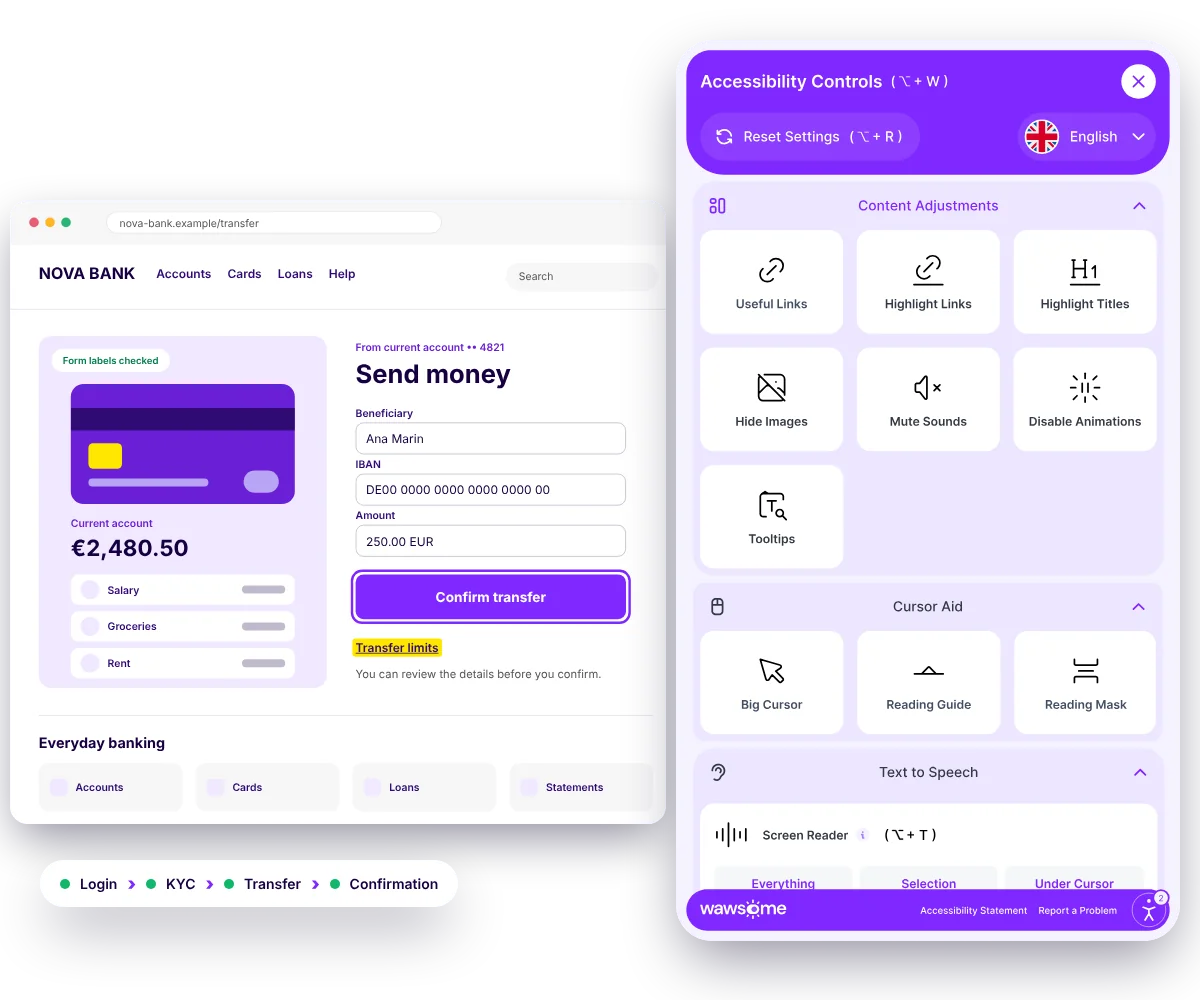
See the difference on a transfer form
Turn on a few widget settings and watch this sample transfer form change. It's a small preview of what the Wawsome widget lets customers do on your website.
Try it on this form
Send money
To: Ana Marin. Amount: 250 EUR. Reference: rent for May.
You can review the details before you confirm the transfer.
Check the detailsConfirm transfer
One platform. Every angle covered.
Automatic fixes
AI scans and patches selected issues such as missing image descriptions, broken ARIA and navigation structure.
Ongoing tracking
Your site is checked continuously, with accessibility score, issue trends and full history available in one place.
Easy setup
Deploy through one JS line or a GTM tag. Wawsome works at the browser layer, without server-side codebase changes.
Accessibility Statement
An individual Accessibility Statement, mapped in Wawsome documentation to the EAA, WCAG 2.1 AA, EN 301 549 and national laws.
Accessibility Widget
Predefined accessibility profiles, controls for text size, spacing, typeface, contrast and color scheme, keyboard-only navigation, screen-reader support, AI-assisted ALT and ARIA improvements, brand configuration and multi-language support.
Accessibility Scanner
WCAG 2.1 and 2.2 AA checks, prioritized plain-language reporting, Low, Medium and High severity, visibility across WCAG A, AA and AAA and an overall risk score.
- WCAG 2.1 and 2.2 AA
- EN 301 549
- European Accessibility Act


Continuous monitoring
Recurring scans check changes, alerts highlight areas that need attention and reports provide step-by-step remediation guidance.
A release ships
A new login screen, a payment step or a design update.
A recurring scan checks it
Wawsome scans your pages again on schedule.
An alert flags what changed
New issues are highlighted by severity.
The right team fixes it
Reports give step-by-step guidance.
Third-party identity, e-signature and payment components need their own plan
Critical financial journeys often run through external providers for identity checks, e-signatures, payments or documents. The widget works where its script is installed. If one component fails, the whole journey can fail.
Needs the vendor or the source
- Identity or KYC providers, if the script can't be added there
- E-signature and document viewers inside iframes
- Payment pages hosted by a payment provider
- Statements and contracts in PDF
What Wawsome does
- Runs on your website and portal, and on vendor pages that allow the script
- Scans the financial journey and flags issues by severity
- Reports third-party issues separately, for technical or contractual escalation
- Checks again after every release or vendor update
More independent journeys. Lower friction. Stronger governance.
Customer autonomy
More routine financial operations can be completed through digital self-service.
- Self-service completion
- Digital adoption
Lower cost-to-serve
Fewer interactions need to move to call centers or branches because of accessibility barriers.
- Cost-to-serve
- Support contacts
Better activation
More users can complete onboarding, KYC and their first key actions, after the traffic has already been paid for.
- Activation rate
- KYC completion
Stronger retention
A more robust digital experience removes functional reasons for customers to switch provider.
- Digital churn
Trust and partner readiness
Reports and the Accessibility Statement show customers, partners and compliance teams that inclusion is part of the product.
- Complaint volume
- Partner readiness
Governance across products and markets
Accessibility is monitored and documented across products and markets, not checked once and forgotten.
- Issue trend
- Progress history
KPIs accessibility can influence
- Self-service completion
- KYC completion
- Activation rate
- Cost-to-serve
- Support contacts
- Digital churn
Trusted by Leaders and Industry Innovators


See where accessibility barriers may interrupt your most valuable financial journeys.
Start with your website or portal. Find barriers across login, onboarding, KYC, payments, transfers, lending and documents. Then build a prioritized plan to fix and monitor them.
Need a manual audit of your website and documents? See our audits
Digital accessibility is not a niche requirement. It decides who can manage their money on their own.
The Valuable 500 argues that leaving out 16% of the world's population should be treated as a material risk. Its members include financial organizations such as Barclays and UniCredit (industry context, not Wawsome clients). Yet the research it cites shows most websites are still not fully accessible.
16%
of the world's population experience significant disability
Upwards of 90%
of the world's websites are not fully accessible to the disability community
Source: The Valuable 500
In finance, accessibility decides whether customers can manage their own money. If the digital journey is hard to use, they need help with things they should be able to do alone.
Banking and fintech digital accessibility FAQ
What is digital accessibility in banking and fintech?
It means building and maintaining financial websites, portals and apps so people with different visual, motor, cognitive and other needs can use them on their own. That covers login, authentication, KYC, payments, transfers, cards, lending and statements.
Why is accessibility important for banks?
In banking, accessibility affects customer autonomy, cost-to-serve, trust and risk governance. When customers can't complete routine operations online, requests move to call centers or branches, and barriers can become a reason to switch banks.
Why is accessibility important for fintech products?
Fintech products compete on speed, simplicity and digital experience. Barriers in onboarding, KYC, 2FA, payments, wallets or lending can lower activation, increase drop-off and make scaling or enterprise partnerships harder.
Which banking and fintech journeys should be prioritized?
We recommend starting with login, 2FA, onboarding and KYC, transfers, payments, cards, lending and documents. These steps decide whether a customer can act on their own and whether a new user activates.
How can accessibility affect cost-to-serve and CAC?
When customers are blocked online, routine requests move to call centers or branches, which raises cost-to-serve. In fintech, drop-off after paid acquisition means the same marketing spend brings fewer activated users.
How can banks manage third-party accessibility risk?
Critical journeys often depend on external identity, e-signature, payment or document providers. Wawsome reports issues from those components separately, so you can raise them with the vendor, technically or contractually.
Does the European Accessibility Act apply to banking and fintech?
Consumer banking services are named in the European Accessibility Act, which applies since 28 June 2025. Consumer-facing fintech services may also fall within its scope. Microenterprises, with fewer than 10 employees and a turnover or balance sheet up to EUR 2 million, are exempt from the service requirements. Check your national law for the details.
What does the Wawsome Accessibility Widget do?
The Widget provides accessibility profiles and controls for text size, spacing, typography, contrast and color, along with keyboard-only navigation, screen-reader support and AI-assisted improvements for selected ALT, ARIA and structural issues.
What does the Wawsome Scanner do?
The Wawsome Scanner supports WCAG 2.1 and 2.2 AA checks, severity-based prioritization, risk scoring, recurring monitoring, alerts and reporting, so teams can see which issues need attention.
Why is continuous accessibility monitoring necessary for financial products?
Banking and fintech products change often. Releases, design updates, A/B tests and third-party component changes can bring barriers back after a one-time audit. Recurring monitoring helps catch these regressions early.
Can Wawsome support accessibility due diligence?
Yes. Accessibility reports and the Accessibility Statement give you evidence to share with enterprise partners, banks and compliance teams during procurement or due diligence.
Which KPIs can accessibility influence in banking and fintech?
In banking: digital adoption, self-service completion, cost-to-serve, digital churn, support contacts and complaint volume. In fintech: activation rate, KYC completion, CAC efficiency, support tickets, product adoption and retention.
Does Wawsome require a complete website rebuild?
No. Wawsome deploys through a JavaScript tag or Google Tag Manager and works at the browser layer, without server-side codebase changes. Structural issues and third-party components that need source-level work are identified and prioritized separately.
Make every critical financial journey easier to complete, monitor and improve.
Find barriers in the journeys that matter most, prioritize the fixes and keep a continuous accessibility control layer around your digital product.
- Accessibility Widget
- Scanner
- Continuous Monitoring
- Accessibility Statement
- Accessibility reporting
- WCAG 2.2 AA and EN 301 549