
Digital accessibility for hospitality
Digital accessibility for hotels, accommodation and hospitality
Wawsome helps hotel groups, accommodation providers and hospitality brands find, fix and continuously monitor accessibility barriers across search, rooms and rates, reservations, menus, orders, payment, location and guest information.
- Checks for booking, menus and reservations
- One accessibility baseline across every property
1.3 billion
people worldwide experience significant disability.
Source: The Valuable 500
Accessible tourism
is one of the priority areas in the EU's Transition Pathway for Tourism.
Source: European Commission, Transition Pathway for Tourism
1 of 5
disability inclusion KPIs proposed by The Valuable 500 is Digital Accessibility.
Source: The Valuable 500
Where the guest journey breaks before arrival
Guests use your website to compare rooms, check rates, read menus, book a table, order, find the location and pay. If one of these steps is hard to use, switching is easy. A few clicks and the guest books through an OTA, a platform or a competitor.
Find the property
Where guests get stuck
Property and venue pages with unclear headings, photo galleries without descriptions and menus a screen reader can't announce.
How Wawsome helps
The scanner flags missing alt text, heading and menu issues by severity. AI-assisted ALT and ARIA improvements cover selected cases.
Search and dates
Where guests get stuck
Date pickers and guest selectors that only work with a mouse, or that don't say which dates are selected.
How Wawsome helps
Keyboard-only navigation helps guests move through the calendar. The scanner lists focus and labeling issues for your developers or booking vendor.
Rooms, rates or table
Where guests get stuck
Room and rate comparisons with low contrast, small print and cards that read in the wrong order.
How Wawsome helps
Widget settings for text size, spacing and contrast let each guest adjust the page. Structure issues are reported with the WCAG criterion they fail.
Menus and offers
Where guests get stuck
Menus and offers published as images or untagged PDFs that screen readers can't read.
How Wawsome helps
The scanner finds images without text alternatives. PDF menus go into a separate backlog, because they need fixing in the file itself.
Guest details
Where guests get stuck
Form fields without labels, unclear error messages and focus that jumps around.
How Wawsome helps
Missing labels and error handling issues are listed in plain language, so the right team can fix them at the source.
Payment and confirmation
Where guests get stuck
Payment steps with buttons a keyboard can't reach, and confirmations a screen reader doesn't announce.
How Wawsome helps
Keyboard-only navigation helps guests reach every control. Remaining structural issues are prioritized, because they decide if the booking is completed.
Pre-arrival and repeat visits
Where guests get stuck
Directions, check-in details and loyalty pages that change often and break after updates.
How Wawsome helps
Recurring scans catch new issues after content or template changes, before guests run into them.
Standardize accessibility across the guest journey. Then keep it under control.
Eight risks for hotels, restaurants and venues, each with how Wawsome responds and the KPI it touches.
Compliance across markets
If guests book or pay on your website, it counts as an e-commerce service under the European Accessibility Act. Hotel groups have to keep this consistent across countries, brands and domains. Microenterprises are exempt from the service requirements.
How Wawsome helps
The same scanning and reporting criteria apply to every property and domain, with issues mapped to WCAG criteria. That gives you one comparable baseline.
- Compliance evidence
The booking engine
Date pickers, room selection, rate comparison, upsells, guest forms, payment and confirmation can be hard to use with assistive technology.
How Wawsome helps
We recommend starting with search, rooms, rates, guest forms, payment and confirmation, because they decide if a direct booking is completed.
- Booking conversion
Lost direct bookings
Barriers on your own website can push guests to OTAs, booking platforms or a competitor, even when they wanted to book direct.
How Wawsome helps
Fewer navigation and interaction barriers can help more guests finish the booking or reservation on your own channel.
- Direct booking share
Distribution cost
Every booking that moves from your website to an intermediary can mean a higher commission and less value kept by the property.
How Wawsome helps
Reports show where the steps that lead to a booking break, so your team can fix those first.
- OTA commission exposure
Menus, maps and opening hours
Menus in inaccessible PDFs, low contrast, reservation forms and maps that don't work with a keyboard can block simple actions, like checking an offer or booking a table.
How Wawsome helps
The scanner finds missing text alternatives, contrast and form issues. Content that needs work in the source file goes into its own backlog.
- Reservation abandonment
Brand consistency
Different accessibility levels across local websites and properties weaken the promise of one guest experience. For brands built on welcome, digital exclusion is very visible.
How Wawsome helps
A central view shows scores, issues and progress for every property and website, so you can compare them and close the gaps.
- Repeat visits
Local discovery and reach
Local pages, unstructured content and images without useful descriptions make key property information harder to find and use. That matters for international travelers, older guests and families.
How Wawsome helps
Clear headings, alt text and structured content help guests and assistive technology understand each page. The scanner shows where they are missing.
- Organic traffic
Constant content change
Seasonal offers, menus, events, room updates and local campaigns change all the time. Each change can bring accessibility issues back.
How Wawsome helps
Recurring scans catch issues introduced by property teams, menu changes, events and campaigns, before they pile up.
- Customer service contacts
See the difference on a booking form
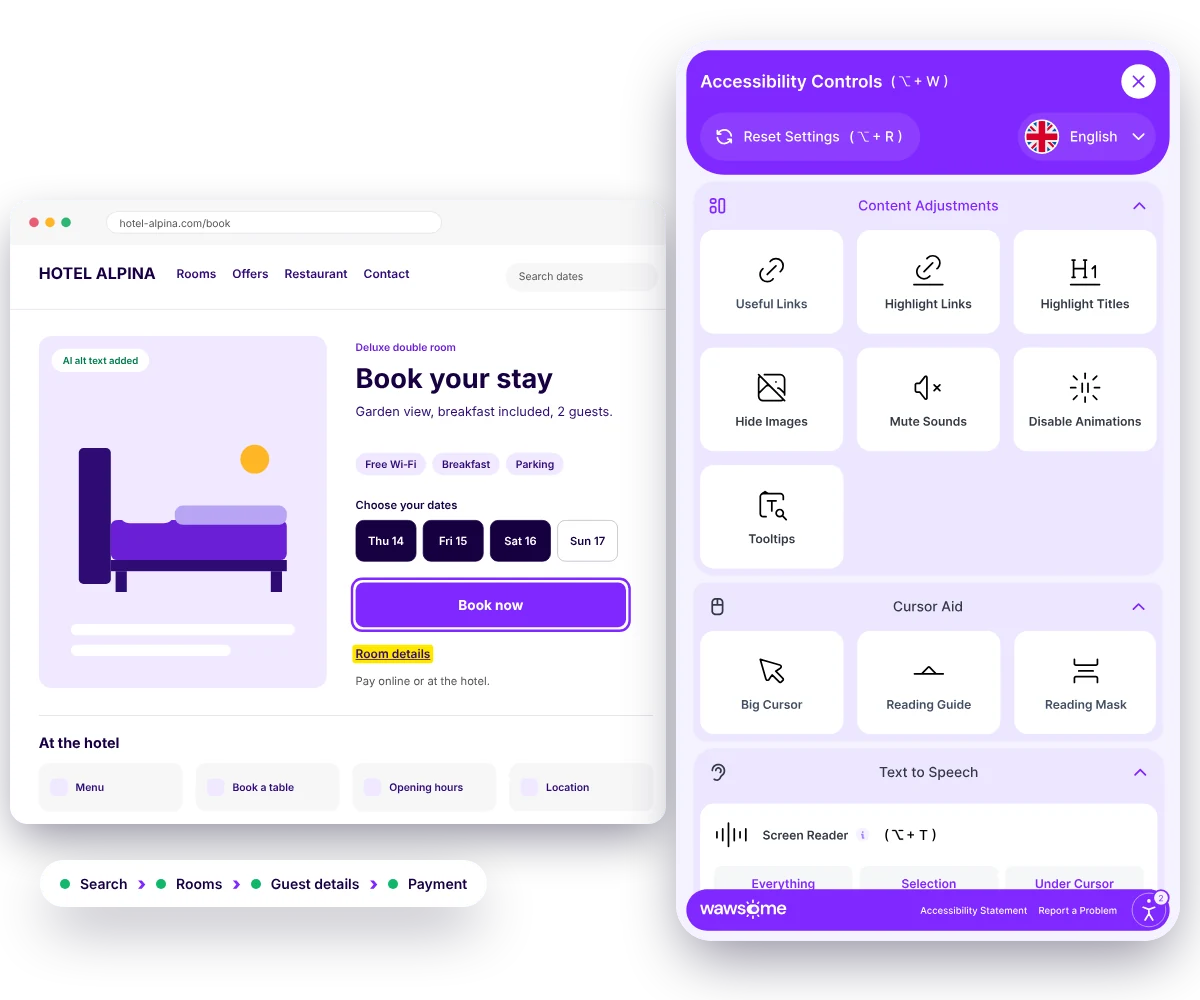
Turn on a few widget settings and watch this sample booking form change. It's a small preview of what the Wawsome widget lets guests do on your website.
Try it on this form
Book your stay
Room: double room with garden view. Dates: 14 to 16 May, 2 guests.
Pay online or at the hotel. You'll get a confirmation by email.
Check room detailsBook now
One platform. Every angle covered.
Automatic fixes
AI scans and patches selected issues such as missing image descriptions, broken ARIA and navigation structure.
Ongoing tracking
Your site is checked continuously, with accessibility score, issue trends and full history available in one place.
Easy setup
Deploy through one JS line or a GTM tag. Wawsome works at the browser layer, without server-side codebase changes.
Accessibility Statement
An individual Accessibility Statement, mapped in Wawsome documentation to the EAA, WCAG 2.1 AA, EN 301 549 and national laws.
Accessibility Widget
Predefined accessibility profiles, controls for text size, spacing, typeface, contrast and color scheme, keyboard-only navigation, screen-reader support, AI-assisted ALT and ARIA improvements, brand configuration and multi-language support.
Accessibility Scanner
WCAG 2.1 and 2.2 AA checks, prioritized plain-language reporting, Low, Medium and High severity, visibility across WCAG A, AA and AAA and an overall risk score.
- WCAG 2.1 and 2.2 AA
- EN 301 549
- European Accessibility Act


Continuous monitoring
Recurring scans check changes, alerts highlight areas that need attention and reports provide step-by-step remediation guidance.
A property updates an offer
A new menu, a seasonal page or a room update.
A recurring scan checks it
Wawsome scans your pages again on schedule.
An alert flags what changed
New issues are highlighted by severity.
The right team fixes it
Reports give step-by-step guidance.
Third‑party booking engines and PDF menus need their own plan
Many hotels use a booking engine from a vendor, on another domain or inside an iframe. The widget works where its script is installed. PDF menus and brochures need fixing in the file itself.
Needs the vendor or the source file
- A vendor booking engine, if the script can't be added there
- Tagging and reading order inside PDF menus
- Third-party widgets for reviews, chat or maps
- Content rules for every property team
What Wawsome does
- Runs on your website, and on the booking engine if your vendor allows the script
- Scans the booking journey and flags issues by severity
- Gives you reports to share with your booking vendor
- Checks again after menus, offers or rooms change
More direct bookings. More consistent guest experiences.
More direct bookings
Fewer barriers on your own channel can help more guests finish the booking with you.
- Direct booking share
- Booking conversion
Protected margin
Less dependence on OTAs and reservation platforms for guests who hit a barrier on your site.
- OTA commission exposure
- Cost per reservation
One standard across properties
The same criteria across hotels, brands and markets support a more consistent guest experience.
- Repeat visits
Less manual rechecking
Automated monitoring means you don't have to recheck every menu, event or campaign by hand.
- Customer service contacts
A welcome that starts online
The promise of hospitality begins at the first digital touchpoint, before the guest reaches the door.
- Repeat visits
- Loyalty usage
Governance and audit readiness
Central reports and history show management and partners the risks, fixes and progress for every property.
- Issue trend
- Progress history
KPIs accessibility can influence
- Direct booking share
- Booking conversion
- OTA commission exposure
- Reservation abandonment
- Repeat visits
- Customer service contacts
Trusted by Leaders and Industry Innovators


See where accessibility barriers may interrupt the guest journey.
Start with your website or booking flow. Find barriers across search, rates, room or table selection, forms, payment, menus and location information. Then build a prioritized plan to fix and monitor them.
Need a manual audit of your website and documents? See our audits
Digital accessibility is not a niche requirement. It is part of welcoming every guest.
The Valuable 500 argues that leaving out 16% of the world's population should be treated as a material risk. Yet the research it cites shows most websites are still not fully accessible.
16%
of the world's population experience significant disability
Upwards of 90%
of the world's websites are not fully accessible to the disability community
Source: The Valuable 500
Hospitality starts before arrival. If the digital journey is hard to use, the guest experience can fail before the stay begins.
Hospitality digital accessibility FAQ
What is digital accessibility in accommodation and hospitality?
It means building and maintaining hotel, accommodation and hospitality websites so people with different visual, motor, cognitive and other needs can use them. That covers search, reservations, room selection, menus, orders, payment, location and guest information.
Why is accessibility important for hotel direct bookings?
Barriers in search, date selection, room choice, guest forms, payment or confirmation can stop a direct booking. When your own website is hard to use, guests may book through an OTA or a competing property instead.
Which hotel booking steps should be prioritized?
We recommend starting with search, rooms, rates, guest forms, payment and confirmation. These steps decide whether a guest can complete the booking on your own website.
Why is accessibility important for restaurant and hospitality websites?
Guests use the website to check menus, opening hours, availability, events, locations and reservations. If those actions are hard to complete, it's easy to pick another venue.
How can accessibility affect OTA dependency?
If a guest can't complete a booking on your website, they may use an OTA or another intermediary instead. That's why direct booking share and OTA commission exposure are useful KPIs to track.
How can hotel groups keep accessibility consistent across properties?
Inconsistent accessibility across local websites creates uneven guest experiences. Applying the same scanning, reporting and monitoring criteria to every property gives the group one comparable standard.
Does the European Accessibility Act apply to hotels and restaurants?
If guests can book or pay on your website, that service counts as an e-commerce service under the European Accessibility Act. Microenterprises, with fewer than 10 employees and a turnover or balance sheet up to EUR 2 million, are exempt from the service requirements. Details vary by country, so check your national law.
What does the Wawsome Accessibility Widget do?
The Widget provides accessibility profiles and controls for text size, spacing, typography, contrast and color, along with keyboard-only navigation, screen-reader support and AI-assisted improvements for selected ALT, ARIA and structural issues.
What does the Wawsome Scanner do?
The Wawsome Scanner supports WCAG 2.1 and 2.2 AA checks, severity-based prioritization, risk scoring, recurring monitoring, alerts and reporting, so teams can see which issues need attention.
Why is continuous accessibility monitoring important for hospitality websites?
Menus, offers, seasonal pages, property updates, local campaigns and booking components change often. Each change can bring accessibility issues back after a first round of fixes, so recurring monitoring matters.
Can Wawsome monitor several hotel properties or websites?
Yes. You can apply the same criteria to multiple properties, brands, domains and countries, and follow scores, issues and progress from one central view.
How can Wawsome help with inaccessible menus and PDFs?
Wawsome helps you find content that is hard to access, such as menus published as images or untagged PDFs. Fixing a PDF needs work in the file itself, so these items are prioritized for your content or technical team.
Does Wawsome require a complete website rebuild?
No. Wawsome deploys through a JavaScript tag or Google Tag Manager and works at the browser layer, without server-side codebase changes. If your booking engine runs on a vendor's domain, the script needs to be added there too. Structural issues that need source-level work are identified separately.
Make the digital guest experience as welcoming as the physical one.
Find barriers in the guest journeys that matter most, protect your direct channel and keep accessibility under control as content, properties and markets change.
- Accessibility Widget
- Scanner
- Continuous Monitoring
- Accessibility Statement
- Multi-property reporting
- WCAG 2.2 AA and EN 301 549