
Make essential digital services easier to access, use and complete
Digital accessibility for utilities
Wawsome helps energy, gas and water providers find, prioritize, fix and continuously monitor accessibility barriers across customer accounts, bills, payments, meter readings, contracts, service requests and outage information.
- Checks for bills, payments, meter readings and requests
- PDF bills and statements flagged for their own plan
23.9%
of people aged 16 and over in the EU have a disability.
Source: Eurostat, 2024
13.2%
of people with a disability in the EU couldn't keep their home adequately warm, compared with 8.0% of people without a disability.
Source: Eurostat, Disability statistics: housing conditions, 2024 data
1 of 5
Digital accessibility is one of five disability inclusion KPIs proposed by The Valuable 500.
Source: The Valuable 500, ESG and Disability Data white paper, 2023
Your customers depend on digital services for essential tasks. Can everyone complete them on their own?
Customer portals now handle contracts, bills, payments, meter readings, notifications and outage information. When these journeys aren't accessible, the cost shows up in calls, late payments, low portal use and lost trust.
Sign in and account
Where customers get stuck
Login forms with unlabeled fields, one-time codes that expire too fast and account menus a keyboard can't reach.
How Wawsome helps
The scanner flags missing labels, focus problems and timeouts by severity, so customers can get into their account on their own.
Bill and usage
Where customers get stuck
Bills shown only as images, usage charts with no text alternative and amounts in low contrast.
How Wawsome helps
Charts and images without text alternatives are flagged, and AI suggests image descriptions you can review. Widget settings make amounts easier to read.
Meter reading
Where customers get stuck
Reading forms with strict number formats, photo uploads that only work with a mouse and errors that just say “invalid value”.
How Wawsome helps
Labels, instructions, error messages and upload controls are listed in plain language and prioritized, so more customers send their reading on time.
Payment
Where customers get stuck
Payment pages run by an external provider, sessions that time out and confirmations a screen reader doesn't announce.
How Wawsome helps
Bill and payment pages are treated as critical and checked first. Issues on third-party payment pages are reported separately for the vendor.
Contract
Where customers get stuck
Tariff comparisons built as images, contract terms only in PDF and checkboxes without a clear name.
How Wawsome helps
Tables, checkboxes and link text are checked on every scan. Issues in PDF contracts go into their own document plan.
Service request
Where customers get stuck
Request forms with dropdowns a keyboard can't open, CAPTCHAs that block some users and no confirmation after sending.
How Wawsome helps
Form issues are flagged in plain language, so your developers can fix them at the source and fewer requests end up as calls.
Outage information
Where customers get stuck
Outage maps with no text list, status shown only by color and alerts that appear without being announced.
How Wawsome helps
Maps, color-only status and live updates are flagged by severity. Recurring scans check the outage pages after every change.
Which accessibility rules apply to utility websites?
It depends on the service and who runs it. The European Accessibility Act doesn't name utilities as a category, but contracts concluded online with consumers can fall under its e-commerce rules. Publicly owned utilities may count as public sector bodies under the Web Accessibility Directive. Assess each service and market with your legal team.
| Provider | Main rules | What it means for your website |
|---|---|---|
| Providers concluding contracts with consumers online | European Accessibility Act, e-commerce services (can apply) | Online sign-up, contract changes and payments for consumers can be in scope since 28 June 2025. Assess each service and market with your legal team. |
| Publicly owned utilities | Web Accessibility Directive and national law (may apply) | If the utility counts as a public sector body, its websites and apps should meet WCAG 2.1 AA and publish an accessibility statement. |
| Every energy, gas and water provider | WCAG 2.1 AA and EN 301 549 | The technical standard both laws point to, and a practical baseline for customer journeys. |
Sources: Directive (EU) 2019/882, Article 2(2)(f) and Article 3(30), and Directive (EU) 2016/2102. Microenterprises are exempt from the EAA service rules. This is general information, not legal advice.
Protect the essential customer journeys, not just individual pages.
Eight risks for energy, gas and water providers, each with how Wawsome responds and the KPI it touches.
Compliance exposure
Customer portals and digital services may have to meet the accessibility rules of each market. The exact obligations depend on the service, the journey and national law.
How Wawsome helps
Wawsome Scanner shows issues and their severity, mapped to WCAG criteria. Reports and the Accessibility Statement give Legal and Compliance a shared record.
- Complaint volume
Customer experience
Bills, usage charts, accounts, meter reading forms, service requests and payments can be hard to use for people with visual, motor or cognitive needs.
How Wawsome helps
Account access, bills, payments, meter readings, contracts, requests and outage pages are checked first, where customer impact is highest.
- Self-service rate
Operational cost
When customers can't finish a simple task online, they call the contact center or visit a service point. Each of those contacts costs more than self-service.
How Wawsome helps
Reports show where self-service breaks, so your team can fix the steps that create the most calls first.
- Call center volume
Collection and cash flow
Barriers in viewing a bill, reaching the account or paying online can delay customer actions and add friction to collection.
How Wawsome helps
Bill and payment pages are treated as financially critical touchpoints and prioritized in the fix plan.
- Collection efficiency
Digital adoption
Portals, apps and self-service deliver less value when part of your customer base can't use them well.
How Wawsome helps
Accessibility is checked across your portal and site, with the score and issue history in one place.
- Portal adoption
Reputation and trust
Leaving vulnerable customers out of essential digital services can lead to complaints, public criticism and closer scrutiny.
How Wawsome helps
Documented progress and an Accessibility Statement show what was checked and fixed, not just a policy.
- Complaint volume
Frequent change
Tariff changes, contract updates, campaigns, portal releases and notices can bring issues back after a one-time fix.
How Wawsome helps
Recurring scans check your pages after every change and alert you before issues pile up.
- Self-service rate
Documents
PDF bills, statements, contracts and notices can stay inaccessible even after the website and portal are improved.
How Wawsome helps
Documents are listed as their own work stream, so they don't get lost in the website backlog.
- Support contacts
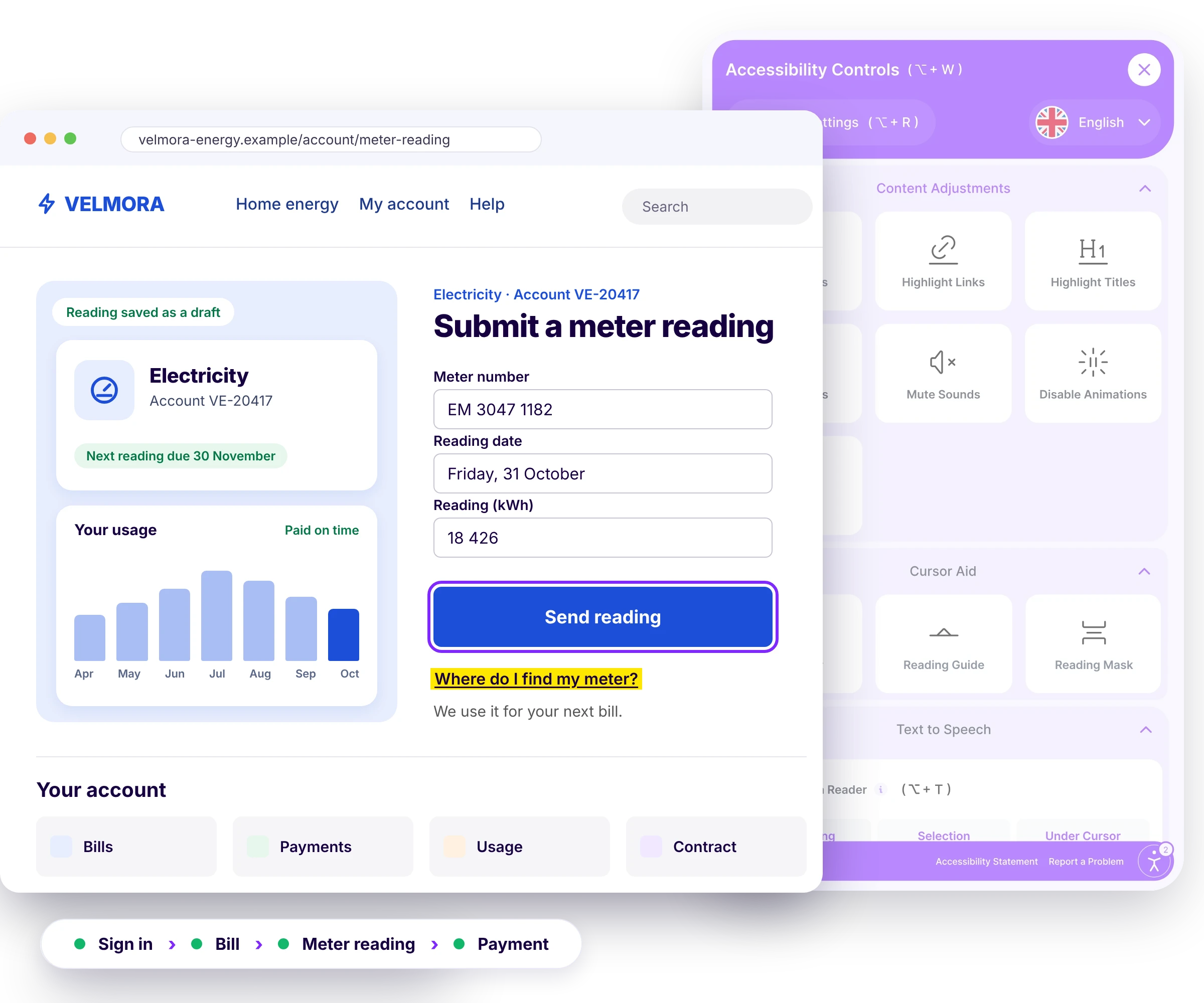
See the difference on a meter reading form
Turn on a few widget settings and watch this sample form change. It's a small preview of what the Wawsome widget does on your site.
Try it on this form
Submit a meter reading
Meter number: 4402 1187. Reading: 04512 kWh. Date: 12 March.
You can also send a photo of your meter.
Where do I find my meter?Send reading
One platform. Every angle covered.
Automatic fixes
AI scans and patches selected issues such as missing image descriptions, broken ARIA and navigation structure.
Ongoing tracking
Your site is checked continuously, with accessibility score, issue trends and full history available in one place.
Easy setup
Deploy through one JS line or a GTM tag. Wawsome works at the browser layer, without server-side codebase changes.
Accessibility Statement
An individual Accessibility Statement, mapped in Wawsome documentation to the EAA, WCAG 2.1 AA, EN 301 549 and national laws.
Accessibility Widget
Predefined accessibility profiles, controls for text size, spacing, typeface, contrast and color scheme, keyboard-only navigation, screen-reader support, AI-assisted ALT and ARIA improvements, brand configuration and multi-language support.
Accessibility Scanner
WCAG 2.1 and 2.2 AA checks, prioritized plain-language reporting, Low, Medium and High severity, visibility across WCAG A, AA and AAA and an overall risk score.
- WCAG 2.1 and 2.2 AA
- EN 301 549
- European Accessibility Act


Continuous monitoring
Recurring scans check changes, alerts highlight areas that need attention and reports provide step-by-step remediation guidance.
A change goes live
A tariff change, a new campaign, updated terms or a portal release.
A recurring scan checks it
Wawsome scans your pages again on schedule.
An alert flags what changed
New issues are highlighted by severity.
The right team fixes it
Reports give step-by-step guidance.
Bills, statements and contracts in PDF need their own plan
Many utility journeys run through external payment providers, portal vendors or document systems. Wawsome works on your website and on vendor pages that allow the script. What it can't change in the browser goes to the vendor or your technical backlog.
Needs the vendor or the source
- Customer portals run by a vendor, if the script can't be added there
- Payment pages hosted by a payment provider
- Outage maps and tools embedded from another provider
- PDF bills, statements, contracts and notices
- Free or self-hosted widgets often need your own server or API, plus security updates you maintain
- No clear answer on where visitor data is processed, or a data processing agreement
What Wawsome does
- Runs on your website and portal pages that allow the script
- Scans the customer journey on your website and flags issues by severity
- Reports third-party issues separately, for technical or contractual escalation
- Moves issues it can't fix in the browser into a prioritized technical backlog
- Hosted and updated by Wawsome, with no server or API to run on your side
- ISO 27001 certified information security and GDPR-aligned data processing
Accessibility that supports self-service, lower service costs and reliable customer journeys.
More self-service
More customers can finish essential tasks without help from an agent.
- Self-service rate
- Portal adoption
Lower cost-to-serve
Fewer accessibility blockers can mean fewer avoidable calls and visits for tasks built to be digital.
- Call center volume
- Support contacts
Smoother payments
Fewer barriers in bills and payment journeys help customers act on time and support collection.
- Digital payment adoption
- Collection efficiency
Stronger trust
You can show that accessibility is part of the real service, not only a policy statement.
- Complaint volume
Higher digital adoption
More of your customers can use the portal and digital channels you've invested in.
- Portal adoption
- Self-service rate
Better governance
Accessibility becomes a monitored, documented part of operations instead of a one-time project.
- Issue trend
- Progress history
Measure what accessibility changes
Accessibility work is easier to defend when you can see it in numbers. Wawsome tracks the accessibility side on every scan. Your teams can then follow the business KPIs that barriers affect most, journey by journey.
What Wawsome measures for you
Tracked on every scan, in one dashboard.
- Accessibility score and overall risk score
- Issues by severity: low, medium and high
- New issues after releases and content changes
- Issue trend and progress history over time
- Third-party issues, reported separately
Business KPIs accessibility can influence
KPIs that energy, gas and water providers already track. Watch them next to your accessibility data.
Self-service and support
- Self-service rate
- Call center volume
Bills and payments
- Digital payment adoption
- Collection efficiency
Portal and service quality
- Portal adoption
- Complaint volume
These are KPIs to watch, not promised results. The impact depends on your site, your journeys and how fast issues get fixed.
Trusted by Leaders and Industry Innovators


See where accessibility barriers may be adding friction to essential customer journeys.
Start with your own customer journey. Find barriers across account access, bills, payments, meter readings, service requests and outage information. Then build a prioritized plan to fix and monitor them.
Need a manual audit of your website and documents? See our audits
Digital accessibility is becoming part of how organizations measure inclusion, digital quality and customer experience.
The Valuable 500 includes digital accessibility among five proposed disability inclusion KPIs. It asks whether companies review the accessibility of their digital platforms and content, and whether they have a plan to do so. Yet the research it cites shows most websites are still not fully accessible.
16%
of the world's population experience significant disability
Upwards of 90%
of the world's websites are not fully accessible to the disability community
Source: The Valuable 500
Energy and water are essential. Accessibility decides whether every customer can manage them online, on their own.
Utilities digital accessibility FAQ
What is digital accessibility in utilities?
It means making customer websites, portals, documents and digital services usable for people with visual, motor, cognitive or other needs. That covers bills, payments, meter readings, contracts, service requests and outage information.
Why is accessibility important for energy, gas and water providers?
Utilities provide essential services and rely more and more on digital self-service. Barriers can stop customers from finishing routine tasks on their own, which affects support demand, digital adoption, payments and trust.
Which utility customer journeys should be prioritized?
Start with account access, bills, payments, meter readings, contracts, service requests and outage information. They're frequent, essential and important for operations.
Does the European Accessibility Act apply to utilities?
Not as a category. The EAA doesn't name utilities, but contracts concluded online with consumers can fall under its e-commerce rules, depending on the service and national law. Publicly owned utilities may fall under the Web Accessibility Directive. Check each service with your legal team.
How can accessibility affect self-service?
If customers can't use the portal, understand a bill, send a meter reading or finish a request on their own, they move to the call center or a service point. Removing barriers helps more of them stay in self-service.
How can accessibility affect call center volume and cost?
Barriers create avoidable contacts for tasks built to be done online. Removing them can support lower assisted-channel demand and cost-to-serve. Measure the real effect on your own service data.
How can accessibility influence payments and collection?
Barriers in viewing a bill, reaching the account or paying online add friction and can delay customer actions. That's why bill and payment pages are treated as financially critical. Wawsome doesn't promise a specific collection result.
What does the Wawsome Accessibility Widget do?
The Widget provides accessibility profiles and controls for text size, spacing, typography, contrast and color, along with keyboard-only navigation, screen-reader support and AI-assisted improvements for selected ALT, ARIA and structural issues.
What does the Wawsome Scanner do?
The Wawsome Scanner supports WCAG 2.1 and 2.2 AA checks, severity-based prioritization, risk scoring, recurring monitoring, alerts and reporting, so teams can see which issues need attention.
Why do utility websites need continuous accessibility monitoring?
Tariff changes, contract updates, campaigns, new templates and portal releases can bring issues back after a first fix. Recurring scans catch these regressions.
What accessibility risks exist in utility bills and PDFs?
Invoices, statements, contracts and notices can stay inaccessible even after the website improves. They usually need their own inventory, priorities and specialist fixes.
Which utility KPIs can accessibility influence?
Digital payment adoption, self-service rate, call center volume, collection efficiency, portal adoption and complaint volume. Watch them next to your accessibility score and issue trend.
Does Wawsome require a complete website rebuild?
No. Wawsome deploys through a JavaScript tag or Google Tag Manager and works at the browser layer, without server-side codebase changes. Structural issues and third-party components that need source-level work are identified and prioritized separately.
Make accessibility part of how you deliver essential digital services.
You already track digital payments, self-service, call center demand, collection, portal adoption and complaints. Add accessibility to the same measurement and find the barriers that stop customers from finishing key steps on their own.
- Accessibility Widget
- Scanner
- Continuous Monitoring
- Accessibility Statement
- Third-party issue reports
- Multi-language support