
For marketing, digital and growth teams
Make every digital experience count. For every customer.
Your team works hard to attract, engage and convert customers. Accessibility barriers can break that journey. Wawsome brings digital accessibility to marketing teams: find, prioritize and fix barriers across your website, and track progress as your campaigns change.
- Campaign pages and forms checked
- Tracks changes after every launch
23.9%
of people aged 16 and over in the EU have a disability.
Source: Eurostat, 2024
€911bn
European B2C e-commerce turnover in 2025, up 7% on 2024. That's a lot of customer journeys worth getting right.
Source: European E-commerce Report 2026, Ecommerce Europe (38 European countries)
23%
more organic traffic, on average, for websites with higher accessibility scores. A correlation, not a promise.
Source: AccessibilityChecker.org and Semrush, study of 10,000 websites, 2025
You optimize every click. But can every visitor complete the journey?
Six places where accessibility touches the numbers your team already owns.
Acquisition
Your campaigns create demand. Inaccessible navigation, forms or content can stop some visitors from taking the next step. That's friction your ad platform can't fix.
How Wawsome helps
Campaign landing pages and their forms are scanned and monitored, so paid traffic doesn't land on a blocked page.
- Landing page conversion rate
SEO and discoverability
Search-friendly content should also be usable. Image descriptions, clear headings, labeled controls and solid structure help people, and they overlap with good SEO practice.
How Wawsome helps
Headings, text alternatives and labels are checked on every scan. Wawsome doesn't promise rankings.
- Organic visibility
Conversion and CRO
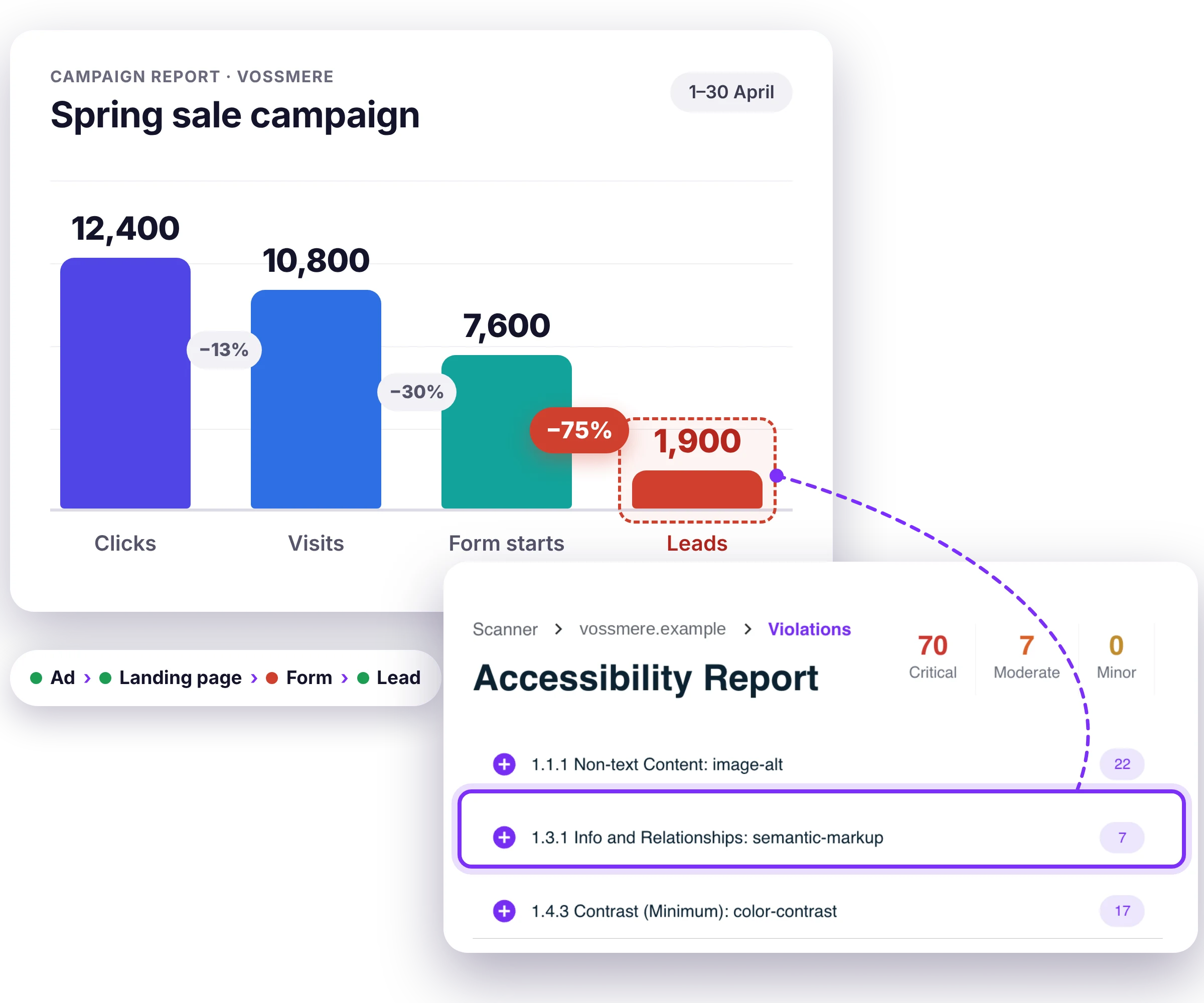
A hard-to-use form, a keyboard trap or an unclear error message can turn a high-intent visit into an abandoned journey.
How Wawsome helps
Conversion-critical steps come first, so you fix the barriers before you pay to bring the traffic back.
- Form completion
Brand and trust
A brand promise is only credible when customers can use the experience behind it.
How Wawsome helps
An accessibility statement and visible progress connect your brand values with real customer interactions.
- Brand sentiment
Customer experience and NPS
Customers who can't finish basic tasks contact support, switch channels or leave.
How Wawsome helps
You can track accessibility friction next to customer feedback, task completion and NPS.
- NPS
Campaign speed
New landing pages, promotions, plugins and A/B tests can bring barriers back after a one-off review.
How Wawsome helps
Recurring scans check every new page and release, and alert you when something breaks.
- Release regression rate
Designed around the work marketing teams already do.
SEO and content
Review headings, image descriptions, links and content patterns before and after you publish.
- Organic visibility
- Accessible template coverage
Paid media and landing pages
Check campaign pages, forms, cookie banners and conversion steps. Add keyboard and screen reader checks to launch QA.
- Landing page conversion rate
- Cost per lead
CRO and experiments
Run accessibility checks on A/B tests, pop-ups, personalization and checkout. Watch what changes after rollout.
- Task completion
- Funnel drop-off
Brand and communications
Review campaign assets, PR pages, microsites, contact routes and customer messages.
- Brand sentiment
- Accessibility complaints
Customer experience and CRM
Check lead forms, onboarding, self-service and support entry points. Send recurring issues to their owners.
- NPS
- Self-service completion
Marketing operations
Assign owners, monitor new issues, report trends and keep accessibility on the launch checklist.
- Issue closure time
- Release regression rate
From first impression to loyal customer, every step should be usable.
Marketing shapes the whole customer journey. A barrier at any step can cost you a customer you already paid to bring in.
Discover
Where customers get stuck
Unclear content structure, images without descriptions and video without captions.
How Wawsome helps
Wawsome checks headings, image descriptions and content patterns on the pages your campaigns send people to.
Explore
Where customers get stuck
Menus, filters and carousels that only work with a mouse.
How Wawsome helps
Your high-value templates are tested first, and barriers are ranked by severity and impact on users.
Convert
Where customers get stuck
Fields without labels, unclear error messages and checkout steps that block the keyboard.
How Wawsome helps
Forms, error messages and checkout steps are checked first, because that's where intent turns into revenue.
Onboard
Where customers get stuck
Confirmation pages, account setup and instructions that screen readers can't follow.
How Wawsome helps
Pages and messages after the sale are part of the scan, so new customers can finish setting up on their own.
Stay and recommend
Where customers get stuck
Self-service pages, preference centers and feedback forms that are hard to use.
How Wawsome helps
Recurring friction is monitored over time, so accessibility can sit next to your customer experience reporting.
One connected approach to digital accessibility. From visibility to action.
AI-assisted fixes
Wawsome fixes eligible issues in the browser and gives clear guidance for the rest. Changes to code, design or content stay with your team, and so does the final review.
Continuous monitoring
Stay informed as new pages and campaigns go live. Wawsome tracks findings and trends, so new issues show up before your customers find them.
Expert audits and testing
Automated checks can't catch every barrier. Add expert reviews, assistive technology testing and a prioritized report for your key journeys.
Reports and accessibility statement
Turn findings into prioritized reports and document your approach. Wawsome helps you write your accessibility statement. A statement alone doesn't make a site compliant.
Accessibility widget
Visitors can adjust text, spacing, contrast and more, or pick a ready-made profile. You set colors, placement and language. The widget supports accessible design and code. It doesn't replace them.
Automated accessibility scanning
Find detectable issues across your website and see where to focus. Wawsome checks against WCAG and sorts findings by severity, so marketing and tech teams can plan the work.
- WCAG 2.1 and 2.2 AA
- EN 301 549
- European Accessibility Act


A clear path from first review to continuous improvement
Four steps, run by the teams that already own your website.
Assess
Pick your priority journeys and set a baseline with scanning and, where needed, expert testing.
Prioritize
Rank findings by severity, impact on users and business value. Give each one a marketing or tech owner.
Improve
Turn on Wawsome where it helps and ship approved fixes in content, design and code.
Measure
Monitor new releases, document progress and review accessibility next to your marketing KPIs.
Not a widget-only answer. A program your team can actually run.
No widget, scanner or statement alone guarantees compliance. Lasting results come from accessible content, design and code, plus testing, fixes and documentation. Here's how the work splits.
Needs your team
- Changes to source code, templates and components
- Content fixes, like headings, link text and image descriptions
- Design decisions on color, focus states and layout
- Third-party tools such as chat, cookie banners or booking forms, through their vendors
- Deciding which legal duties apply, with your legal team
What Wawsome does
- Scans and monitors your pages after every launch
- Fixes eligible issues in the browser and flags the rest
- Ranks findings by severity, so the important ones come first
- Adds expert testing for complex journeys when you need it
- Keeps reports and history for your accessibility statement
- ISO 27001 certified information security and GDPR-aligned data processing
Accessibility obligations are real. The right response is evidence and a plan.
The European Accessibility Act covers certain products and services, including e-commerce and some consumer services. National laws set the details, and WCAG and EN 301 549 are the technical references. What applies to you depends on your service, your markets and your legal context. A good program splits the work like this.
| Team | What they own | How Wawsome supports them |
|---|---|---|
| Marketing | Journeys, campaigns, content and customer experience | Scans, prioritized findings and monitoring for every campaign page |
| Product and engineering | Structural fixes in templates, components and code | Clear issue reports, AI-assisted fixes for eligible issues and a technical backlog |
| Legal and compliance | Deciding which duties apply and documenting them | Reports, progress history and support for your accessibility statement |
General information, not legal advice. Check what applies to you with your legal team. Source: Directive (EU) 2019/882 (European Accessibility Act).
Measure what accessibility changes
Accessibility work is easier to defend when you can see it in numbers. Wawsome tracks the accessibility side. You watch it next to the marketing KPIs you already report on.
What Wawsome measures for you
Tracked on every scan, in one dashboard.
- Critical issues and overall risk score
- New issues after each launch or release
- Time to fix, by severity
- Monitored pages and template coverage
- Third-party issues, reported separately
Marketing KPIs accessibility can influence
Numbers your team already tracks. Watch them next to your accessibility data.
Acquisition and SEO
- Organic visibility
- Landing page conversion rate
Conversion
- Form completion
- Cost per lead
Customer experience
- NPS and customer satisfaction
- Repeat contacts
These are KPIs to watch, not promised results. Measure before and after on the journeys you changed, and keep other campaign changes in mind.
Trusted by Leaders and Industry Innovators










Find the barriers that matter to your customer journey.
Start with the journeys that drive your campaigns: landing pages, forms, checkout and account pages. See what blocks people and what to fix first.
Need a manual audit of your website and documents? See our audits
Accessibility is becoming part of how leaders measure inclusion and customer experience.
The Valuable 500 lists digital accessibility among five proposed disability inclusion KPIs for company reporting. For marketing leaders, that means measurable progress, not one-off statements.
16%
of the world's population experience significant disability
Upwards of 90%
of the world's websites are not fully accessible to the disability community
Source: The Valuable 500
Every campaign is made for everyone. Accessibility decides whether everyone can act on it.
Questions from marketing and growth teams
Why should digital accessibility be a marketing priority?
Marketing shapes the journeys customers use to discover, compare and buy. Accessibility barriers break those journeys and add friction you paid to avoid. How big the business effect is depends on your site, so measure it on your own journeys.
Can improving website accessibility increase conversion rates?
Removing barriers can help more visitors finish forms and purchases. Measure task completion and conversion on the journeys you fixed, before and after, and account for other changes running at the same time.
Does digital accessibility improve SEO rankings?
Accessibility and SEO share good practice, like clear structure, headings and image descriptions. A 2025 study of 10,000 websites found that sites with higher accessibility scores had 23% more organic traffic and ranked for 27% more keywords on average. That's a correlation, not a guarantee.
Is an accessibility widget enough to meet the European Accessibility Act?
No. A widget gives visitors useful settings, but it doesn't make inaccessible content, code or journeys compliant. What applies depends on your service, your markets and the national law that implements the act. You still need testing, fixes and documentation.
Can Wawsome automatically fix every accessibility issue?
No. Automation helps with eligible issues, but it can't replace expert review or fix every structural, content or interaction barrier. Issues that need source changes go to the team that owns them, with clear guidance.
How does Wawsome help marketing teams without in-house accessibility experts?
Wawsome gives you scanning, prioritized findings, monitoring and fix guidance, plus expert audits when you need them. That covers landing pages and forms too. Marketing sets the priorities, while product, engineering and legal handle their part.
How often should we check accessibility after a campaign launch?
Check key templates before launch and monitor after every change. How often depends on how much you release and how risky the pages are. Retest bigger interactive changes with the right methods.
Does Wawsome work with Google Tag Manager, and can we match it to our brand?
Yes. You can add the Wawsome widget with a JavaScript snippet or through Google Tag Manager, and set its colors, placement and language. Keep contrast, keyboard use and screen reader support intact when you customize it, and check how it fits your tech stack.
What is included in an expert accessibility audit?
We agree the scope for each project. It can include key pages or journeys, manual and assistive technology testing, documented issues with severity, and fix recommendations. Ask us for a sample report and our testing method.
How can marketing measure accessibility progress and ROI?
Start with leading measures: issue severity, affected templates, time to fix and new issues after releases. Then look at outcomes like form completion, checkout success, customer satisfaction, NPS and support contacts. Don't credit accessibility for a change without checking other activity.
Do we need a full website rebuild to start?
No. A prioritized review often finds improvements you can make in your current templates, content and settings. Some structural issues will still need design or code changes.
How does Wawsome differ from a free accessibility checker?
A free checker is a good first look. More than 70% of 10,000 websites in a 2025 study didn't meet the checks used, so most sites need more than one scan. Wawsome adds monitoring, visitor settings, reports, fixes for eligible issues and expert audits when you need them.
Your next campaign should be easier to use, not harder to complete.
Start with the journeys that shape customer experience and business results. Wawsome helps you see the gaps and build a realistic plan to close them.
- Accessibility Widget
- Scanner
- Continuous Monitoring
- Accessibility reporting
- JS or GTM setup
- Multi-language support